Updating


iPhone Screenshots
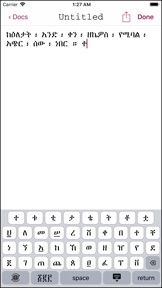
iPad Screenshots

Description
Amharic Writer makes it easy and simple to create, edit, print and share documents written primarily in the Amharic language.
With a choice of two included custom keyboards sets, it becomes even more of a pleasure to touch-type Amharic characters on your iPhone or iPad and watch the letters, numbers, and symbols come alive right under your fingertips..
With Amharic Writer app, you can perform various document-related functions including
- Create a new document
- Edit / modify a document
- Rename a document
- Move a document to a different location
- Delete a document
Amharic Writer comes with two sets of custom Amharic language keyboards; each of which includes an additional Numeric mode which enables you to enter numbers and special symbols in addition to the main alphabetic characters.
- First is the Alphabetic Keyboard set in which the keys are laid out according to their respective positions in the Amharic alphabetic system. Tap on a letter and any available syllables become available to tap in
- Next is the Phonetic Keyboard whereby the keys are arranged in Phonetic order - a la the English language QWERTY layout. If you are familiar with this layout, it becomes quite convenient to adapt your QWERTY proficiency in English into the corresponding close-sounding Amharic character. Naturally, any additional syllables become available once you select a letter.
At any time from within the Alphabetic or the Phonetic keyboard, you may switch to an alternative Numeric mode. This mode incorporates characters from the Amharic and Arabic Number systems. This mode also includes punctuation marks commonly used in the Amharic language.
Switching to the numeric mode to the letter modes and vice versa is as easy as the tap of a button.
If you do not wish to use any of the included keyboards, or you just want to temporarily go on to a different keyboard set, switching to another couldn't be easier, all one tap away from either keyboard.
Your application settings allow you to
decide where you want to keep your documents, whether it is in the cloud or on your device. From within the same settings, you can enable and disable any of the included keyboards.
We hope you will have an enjoyable experience with Amharic Writer and we will do our best to continually update and improve upon the experience of using it.
What's New in Version 2.0
This version contains various fixes and performance improvements.
We hope you will find them all useful.
Seller
Name
Daniel Teklegiorgis
Information
Developer
Categories
Version
2.0
Size
6.4 MB
Game Center
No
VPP Device Licensing
Yes
Rating
Rated: 4+
Compatibility
iOS 14.0 or later
Devices
iPhone 5s, iPhone 6, iPhone 6 Plus, iPhone 6s, iPhone 6s Plus, iPhone SE, iPhone 7, iPhone 7 Plus, iPhone 8, iPhone 8 Plus, iPhone X, iPhone XR, iPhone XS, iPhone XS Max, iPhone 11, iPhone 11 Pro, iPhone 11 Pro Max, iPhone SE (2nd generation), iPhone 12, iPhone 12 Pro, iPhone 12 Pro Max, iPhone 12 mini, iPhone 13, iPhone 13 Pro, iPhone 13 Pro Max, iPhone 13 mini, iPhone SE (3rd generation), iPhone 14, iPhone 14 Plus, iPhone 14 Pro, iPhone 14 Pro Max, iPhone 15, iPhone 15 Plus, iPhone 15 Pro, iPhone 15 Pro Max, iPhone 16, iPhone 16Plus, iPhone 16Pro, iPhone 16ProMax, iPad (5th Generation) Wi-Fi, iPad (5th Generation) Wi-Fi + Cellular, iPad (6th generation) Wi-Fi, iPad (6th generation) Wi-Fi + Cellular, iPad Pro, iPad Pro (Cellular), iPad Pro (9.7-inch), iPad Pro (9.7-inch) (Cellular), iPad Pro 12.9-inch (2nd generation), iPad Pro 12.9-inch (2nd generation) Wi-Fi + Cellular, iPad Pro (10.5-inch), iPad Pro (10.5-inch) Wi-Fi + Cellular, iPad Pro (11-inch), iPad Pro (11-inch) Wi-Fi + Cellular, iPad Pro 12.9-inch (3rd generation), iPad Pro 12.9-inch (3rd generation) Wi-Fi + Cellular, iPad Air, iPad Air (Cellular), iPad Air 2, iPad Air 2 (Cellular), iPad Air (3rd generation), iPad Air (3rd generation) Wi-Fi + Cellular, iPad mini Retina, iPad mini Retina (Cellular), iPad mini 3, iPad mini 3 (Cellular), iPad mini 4, iPad mini 4 (Cellular), iPad mini (5th Generation), iPad mini (5th Generation) Wi-Fi + Cellular, iPad (7th generation) Wi-Fi + Cellular, iPad Pro 11-inch (2nd generation), iPad Pro 11-inch (2nd generation) Wi-Fi + Cellular, iPad Pro 12.9-inch (4th generation), iPad Pro 12.9-inch (4th generation) Wi-Fi + Cellular, iPad Air (4th Generation) (Wi-Fi), iPad Air (4th Generation) (Wi-Fi + Cellular), iPad (8th generation) Wi-Fi, iPad (8th generation) Wi-Fi + Cellular, iPad Pro 11-inch (3rd generation), iPad Pro 11-inch (3rd generation) Wi-Fi + Cellular, iPad Pro 12.9-inch (5th Generation), iPad Pro 12.9-inch (5th Generation) Wi-Fi + Cellular, iPad (9th Generation), iPad (9th Generation) Wi-Fi + Cellular, iPad mini (6th Generation), iPad mini (6th Generation) Wi-Fi + Cellular, iPad Air (5th generation), iPad Air (5th generation) Wi-Fi + Cellular, iPad Pro 11-inch (4th generation), iPad Pro 11-inch (4th generation) Wi-Fi + Cellular, iPad Pro 12.9-inch (6th generation), iPad Pro 12.9-inch (6th generation) Wi-Fi + Cellular, iPad (10th generation), iPad (10th generation) Wi-Fi + Cellular, iPad Air 11-inch (M2) Wi-Fi, iPad Air 13-inch (M2) Wi-Fi, iPad Air 13-inch (M2) Wi-Fi + Cellular, iPad Pro 11-inch (M4) Wi-Fi, iPad Pro 11-inch (M4) Wi-Fi + Cellular, iPad Pro 13-inch (M4) Wi-Fi, iPad Pro 13-inch (M4) Wi-Fi + Cellular, iPad MiniA17Pro, iPad MiniA17ProCellular, iPod touch (6th Generation), iPod touch (7th generation)
Languages
English
App Store: Customer Ratings
Ratings & Reviews
0.0 of 5 (No rating)
App Store: Customer Reviews
No Entry