Updating


iPhone Screenshots




iPad Screenshots





Description
Personal Wine Cellar Database
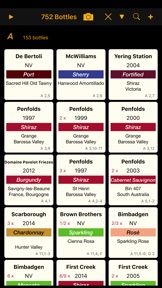
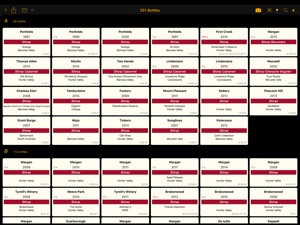
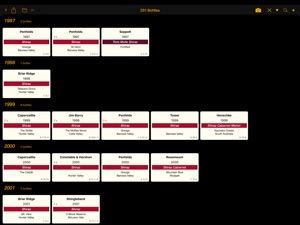
WineCellar is designed to allow users to manage their cellars and keep track of their wines in a simple tabular view of the world. It is ideal for the person who is currently using a spreadsheet to track their wine.
The app works on iPhone and iPad devices. You can use iCloud to keep your devices in synch. You will then have an up to date copy in your pocket on those buying trips to the cellar door or wine store.
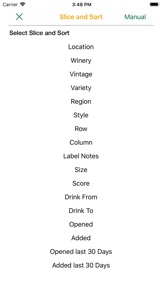
The app is optimised for entering data quickly and, importantly, for sorting and searching for wines under any criteria. Barcodes can be scanned to add or find bottles in your own cellar.
Flexible functions allow you to add individual bottles, add multiple bottles of the same wine in a single action, move bottles, open bottles, set up your racks or locations to match your physical storage/s, search by many options, sort a search result to suit and do data checks to review the integrity of your cellar.
Data can be imported from CSV files for those currently using spreadsheets to track their wines.
Features
- Extensive search and sort functions
- Shortcuts to add extra bottles
- Shortcuts to move bottles
- Record bottles opened, with notes
- Data Checking reports
- Print reports of the bottles
- Create backup CSV files in email or on iCloud
- Use iCloud to synchronise between multiple devices using the same AppleId
- Scan Barcode to add / find bottles in your own cellar.
- Visual auditing tool, with drag and drop capability to move bottles
- Customisable colours for bottle icons
- Settings to customise number (size) of icons displayed on screen.
- Included PDF user manual to fully describe all features.
What's New in Version 2.9
Extensions to the Rack View screen:
- Multiple bottles per cell now allowed to cater for racks that sit 2 out from the wall, etc.
- Double Tap on a cell to include bottles that have been opened for easier auditing.
Fixed a display issue on smaller iPhones, not showing number of bottles on main screen.
Seller
Name
Graham Rawlins
Information
Developer
Categories
Version
2.9
Size
17.7 MB
Game Center
No
VPP Device Licensing
Yes
Rating
Rated 17+ for the following:
Frequent/Intense Alcohol, Tobacco, or Drug Use or References
Compatibility
iOS 12.4 or later
Devices
iPhone 5s, iPhone 6, iPhone 6 Plus, iPhone 6s, iPhone 6s Plus, iPhone SE, iPhone 7, iPhone 7 Plus, iPhone 8, iPhone 8 Plus, iPhone X, iPhone XR, iPhone XS, iPhone XS Max, iPhone 11, iPhone 11 Pro, iPhone 11 Pro Max, iPhone SE (2nd generation), iPhone 12, iPhone 12 Pro, iPhone 12 Pro Max, iPhone 12 mini, iPhone 13, iPhone 13 Pro, iPhone 13 Pro Max, iPhone 13 mini, iPhone SE (3rd generation), iPad (5th Generation) Wi-Fi, iPad (5th Generation) Wi-Fi + Cellular, iPad (6th generation) Wi-Fi, iPad (6th generation) Wi-Fi + Cellular, iPad Pro, iPad Pro (Cellular), iPad Pro (9.7-inch), iPad Pro (9.7-inch) (Cellular), iPad Pro 12.9-inch (2nd generation), iPad Pro 12.9-inch (2nd generation) Wi-Fi + Cellular, iPad Pro (10.5-inch), iPad Pro (10.5-inch) Wi-Fi + Cellular, iPad Pro (11-inch), iPad Pro (11-inch) Wi-Fi + Cellular, iPad Pro 12.9-inch (3rd generation), iPad Pro 12.9-inch (3rd generation) Wi-Fi + Cellular, iPad Air, iPad Air (Cellular), iPad Air 2, iPad Air 2 (Cellular), iPad Air (3rd generation), iPad Air (3rd generation) Wi-Fi + Cellular, iPad mini Retina, iPad mini Retina (Cellular), iPad mini 3, iPad mini 3 (Cellular), iPad mini 4, iPad mini 4 (Cellular), iPad mini (5th Generation), iPad mini (5th Generation) Wi-Fi + Cellular, iPad (7th generation) Wi-Fi + Cellular, iPad Pro 11-inch (2nd generation), iPad Pro 11-inch (2nd generation) Wi-Fi + Cellular, iPad Pro 12.9-inch (4th generation), iPad Pro 12.9-inch (4th generation) Wi-Fi + Cellular, iPad Air (4th Generation) (Wi-Fi), iPad Air (4th Generation) (Wi-Fi + Cellular), iPad (8th generation) Wi-Fi, iPad (8th generation) Wi-Fi + Cellular, iPad Pro 11-inch (3rd generation), iPad Pro 11-inch (3rd generation) Wi-Fi + Cellular, iPad Pro 12.9-inch (5th Generation), iPad Pro 12.9-inch (5th Generation) Wi-Fi + Cellular, iPad (9th Generation), iPad (9th Generation) Wi-Fi + Cellular, iPad mini (6th Generation), iPad mini (6th Generation) Wi-Fi + Cellular, iPad Air (5th generation), iPad Air (5th generation) Wi-Fi + Cellular, iPod touch (6th Generation), iPod touch (7th generation)
Languages
English
App Store: Customer Ratings
Ratings & Reviews
0.0 of 5 (No rating)
App Store: Customer Reviews
No Entry