AboutTermsPrivacyContact
 
Updating
ARorthopaedicGoniometer

ARorthopaedicGoniometer

Released: 2018-11-14
© orthopractis.com
ARorthopaedicGoniometer - QR Code
Version 4.0
17+
Download on the App Store
Version 4.0
17+
Download on the App Store
Released: 2018-11-14
© orthopractis.com

iPhone Screenshots

Screenshot
Screenshot
Screenshot
Screenshot
Screenshot
Screenshot
Screenshot

iPad Screenshots

Screenshot
Screenshot
Screenshot
Screenshot
Screenshot
Screenshot
Screenshot
Screenshot
Screenshot
Screenshot

Description

Range of motion by measuring angles is frequent need in every day clinical tasks during patient examinations by orthopaedic surgeons, physicians, physical therapists and veterinarians. Commonly used method is to measure manually with a classical goniometer the range of motion of a patients joint. Often these manual measurements are inaccurate and depend on the individual interpretation.
Augmented reality (AR) offers a novel method of blending virtual and real word. The measured angles with the advent of the augmented reality technology delivers accuracy and repeatability. Expensive motion capture data system offers Augmented Reality (AR) but this are a privileges of special costly scientific labs.
Apple developed and popularised (AR) Augmented Reality technology readily available for its devices, thus miniaturising expensive high tech labs inside your iPhone in front of you screen.
The AR orthopaedic GoniometerApp is medical software aimed for orthopaedic surgeons, physicians, physical therapists and veterinarians providing tool that allow doctors to:
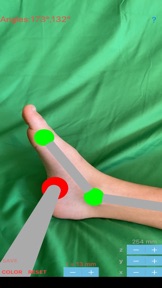
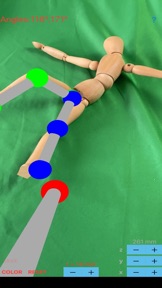
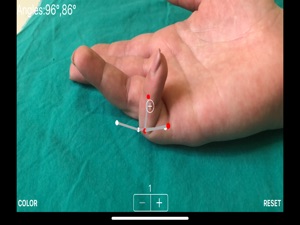
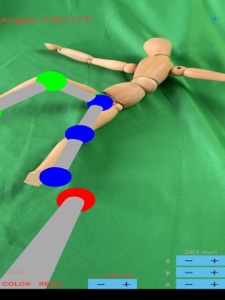
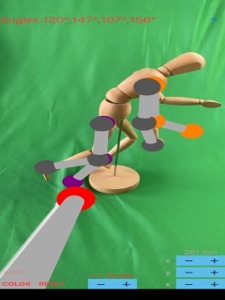
- determine the most accurate possibly way, in live images directly from your the camera in space angles thus estimating easily range of motion. By marking three points by touching over with the phone’s screen a colourful sphere is printed in augmented reality each time while seeing the joint of the patient in screen.
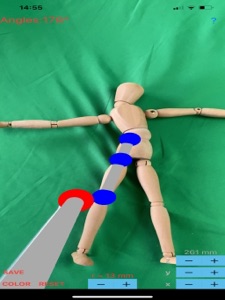
-Angle values are printed sequentially after measurement on the screen, while you can continue measuring and choosing another set of three new points of interest, by easily ‘grabbing’ the last two points of measurement , without loosing their last positions. By ordering the patient to place his extremity in new position you can register, while seeing the last measurement in space in Augmented Reality.
-Point tip sphere is the ’ target cross’ from which the spheres appears during registration each time the screen is touched. The positional calibration of pointer tip sphere in AR can be easily done by allowing the user to adjust the XYZ position of the pointer tip sphere by pressing the directions buttons accordingly. This feature enhanced the accuracy of sphere placement during measurement over joints in Augmented Reality (AR).
-Save the measured values and results as a screenshot to the photo roll for later review or consultation.
Augmented reality offers precision and accuracy because points are taken in 3D space. During the test patients are not constrained by any device and have a total freedom of movement. The ability to integrate -regardless of the camera position - live imagery and measure the angles and estimating the range of motion concurrently makes the app a simple and useful tool in clinical setting.
In a busy everyday practice, measuring angles by the classic way namely classic orthopaedic goniometers , is time consuming and cumbersome. Orthopaedic goniometers must be not be physical present any more. The app offers a very convenient and accurate way to perform measurements of angles in space . The app is not a simple goniometer, is an enhanced product which helps to monitor objectively the course of the treatment and evaluate optimally joint motions. This App is particularly useful especially in clinical settings where you need a quick results without losing time.
All information received from the software output must be clinically reviewed regarding its plausibility before patient treatment! The ARorthopaedic Goniometer App indicated for assisting healthcare professionals. Clinical judgment and experience are required to properly use the software. The software is not for primary image interpretation.

What's New in Version 4.0

bugs fix minor errors corrected

Seller

Name

ORTHOPRACTIS.COM SINGLE MEMBER P.C.

Information

Categories

Version

4.0

Size

1.7 MB

Game Center

No

VPP Device Licensing

Yes

Rating

Rated 17+ for the following:
Frequent/Intense Medical/Treatment Information

Compatibility

iOS 13.2 or later

Devices

iPhone 6s, iPhone 6s Plus, iPhone SE, iPhone 7, iPhone 7 Plus, iPhone 8, iPhone 8 Plus, iPhone X, iPhone XR, iPhone XS, iPhone XS Max, iPhone 11, iPhone 11 Pro, iPhone 11 Pro Max, iPhone SE (2nd generation), iPhone 12, iPhone 12 Pro, iPhone 12 Pro Max, iPhone 12 mini, iPhone 13, iPhone 13 Pro, iPhone 13 Pro Max, iPhone 13 mini, iPhone SE (3rd generation), iPhone 14, iPhone 14 Plus, iPhone 14 Pro, iPhone 14 Pro Max, iPhone 15, iPhone 15 Plus, iPhone 15 Pro, iPhone 15 Pro Max, iPhone 16, iPhone 16 Plus, iPhone 16 Pro, iPhone 16 Pro Max, iPhone 16e, iPhone 17, iPhone 17Pro, iPhone 17ProMax, iPhone Air, iPad (5th Generation) Wi-Fi, iPad (5th Generation) Wi-Fi + Cellular, iPad (6th generation) Wi-Fi, iPad (6th generation) Wi-Fi + Cellular, iPad Pro, iPad Pro (Cellular), iPad Pro (9.7-inch), iPad Pro (9.7-inch) (Cellular), iPad Pro 12.9-inch (2nd generation), iPad Pro 12.9-inch (2nd generation) Wi-Fi + Cellular, iPad Pro (10.5-inch), iPad Pro (10.5-inch) Wi-Fi + Cellular, iPad Pro (11-inch), iPad Pro (11-inch) Wi-Fi + Cellular, iPad Pro 12.9-inch (3rd generation), iPad Pro 12.9-inch (3rd generation) Wi-Fi + Cellular, iPad Air (3rd generation), iPad Air (3rd generation) Wi-Fi + Cellular, iPad mini (5th Generation), iPad mini (5th Generation) Wi-Fi + Cellular, iPad (7th generation) Wi-Fi + Cellular, iPad Pro 11-inch (2nd generation), iPad Pro 11-inch (2nd generation) Wi-Fi + Cellular, iPad Pro 12.9-inch (4th generation), iPad Pro 12.9-inch (4th generation) Wi-Fi + Cellular, iPad Air (4th Generation) (Wi-Fi), iPad Air (4th Generation) (Wi-Fi + Cellular), iPad (8th generation) Wi-Fi, iPad (8th generation) Wi-Fi + Cellular, iPad Pro 11-inch (3rd generation), iPad Pro 11-inch (3rd generation) Wi-Fi + Cellular, iPad Pro 12.9-inch (5th Generation), iPad Pro 12.9-inch (5th Generation) Wi-Fi + Cellular, iPad (9th Generation), iPad (9th Generation) Wi-Fi + Cellular, iPad mini (6th Generation), iPad mini (6th Generation) Wi-Fi + Cellular, iPad Air (5th generation), iPad Air (5th generation) Wi-Fi + Cellular, iPad Pro 11-inch (4th generation), iPad Pro 11-inch (4th generation) Wi-Fi + Cellular, iPad Pro 12.9-inch (6th generation), iPad Pro 12.9-inch (6th generation) Wi-Fi + Cellular, iPad (10th generation), iPad (10th generation) Wi-Fi + Cellular, iPad Air 11-inch (M2) Wi-Fi, iPad Air 13-inch (M2) Wi-Fi, iPad Air 13-inch (M2) Wi-Fi + Cellular, iPad Pro 11-inch (M4) Wi-Fi, iPad Pro 11-inch (M4) Wi-Fi + Cellular, iPad Pro 13-inch (M4) Wi-Fi, iPad Pro 13-inch (M4) Wi-Fi + Cellular, iPad mini (A17 Pro) Wi-Fi, iPad mini (A17 Pro) Wi-Fi + Cellular, iPad (A16) Wi-Fi, iPad (A16) Wi-Fi + Cellular, iPad Air 11-inch (M3) Wi-Fi, iPad Air 11-inch (M3) Wi-Fi + Cellular, iPad Air 13-inch (M3) Wi-Fi, iPad Air 13-inch (M3) Wi-Fi + Cellular, iPad Pro11M5, iPad Pro11M5Cellular, iPad Pro13M5, iPad Pro13M5Cellular, iPod touch (7th generation)

Languages

English

App Store: Customer Ratings

Ratings & Reviews

0.0 of 5 (No rating)

App Store: Customer Reviews

2019-04-21

Unfinished product

Dots for linear markings appear in different planes so angles are unreliable .
Minimal instructions as to how to use the app would be of great help(at $can17.00)
Can’t register multiple measures so useless in busy practice setting
In brief,unfortunately useless ant costly.
Andre
Ortho surgeon
A.C bonedoc
Version 2.0