AboutTermsPrivacyContact
 
Updating
Cosmicast

Cosmicast

Released: 2018-09-16
© 2020 Shihab Mehboob.
Cosmicast - QR Code
Version 2.2.8
12+
Download on the App Store
Version 2.2.8
12+
Download on the App Store
Released: 2018-09-16
© 2020 Shihab Mehboob.

iPhone Screenshots

Screenshot
Screenshot
Screenshot
Screenshot
Screenshot

iPad Screenshots

Screenshot
Screenshot
Screenshot
Screenshot

Description

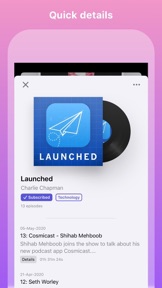
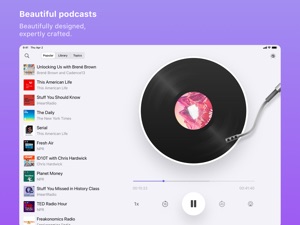
Cosmicast is a beautiful podcast player built with iOS design guidelines in mind. There are no complicated user accounts or settings to configure. You can pick it up and get started immediately. This is made even faster with OPML podcast importing, so you can start using the gorgeous turntable right away.
Key features:
- Beautiful interface
- Browse top podcasts in any region
- View podcasts by a variety of topics and categories
- Adjustable sleep timer
- Adjust the playback speed for when you're in a hurry
- Change skip backwards and forwards durations (long-hold or deep-press to change the durations)
- Great gestures (scrub the turntable and swipe up/down to view/dismiss lists)
- Download episodes and add them to your playlist for offline listening
- Discover related podcasts
- Skip silences
- Chapter markers
- Video podcasts support
- Handoff support
- Change region for different podcast content
- Change app tint
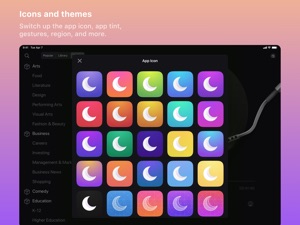
- Change app icons
- Dark mode support
- Siri Shortcuts
- iMessage stickers
- CarPlay
- Universal app with iPad and Apple Watch support
- CarPlay support
- iCloud sync
- Import and export OPML files from within the app or from the iOS Share Sheet
If you have any questions or feedback, please get in touch. Cosmicast was created by an incredibly small team of one and I'd love to hear your thoughts. I'm available through Twitter @JPEGuin.
https://www.pnguin.app/terms
https://www.pnguin.app/privacy

What's New in Version 2.2.8

- Added automatic sleep detection
- The recently updated timeline feed now only fetches the 2 latest episodes from each podcast in the library, and caps at 20 altogether, allowing for more diverse content to appear there
- You can now hide downloaded and played indicators in the recently updated timeline feed (via the ••• button in the recently updated timeline section)
- Added Czech localization
- Improved various other localizations
- Fixed issue where toggling the option to reduce motion in settings wouldn't always reduce motion
- Fixed issue where the segments in the full-screen sized list (settings option) would always default to the first one
- Fixed issue where selecting an item to play from the full-screen sized list (settings option) would display the default list view too
- Fixed issue where audio would overlap and play twice at times
- Fixed issue where attempting to remove items from the playlist wouldn't always remove them
- Minor UI changes
If you have any questions or feedback, please get in touch. Cosmicast was created by an incredibly small team of one and I'd love to hear your thoughts. I'm available through Twitter @JPEGuin.

Seller

Information

Categories

Version

2.2.8

Size

28.7 MB

Game Center

No

VPP Device Licensing

Yes

Rating

Rated 12+ for the following:
Infrequent/Mild Alcohol, Tobacco, or Drug Use or References
Infrequent/Mild Profanity or Crude Humour
Infrequent/Mild Horror/Fear Themes
Infrequent/Mild Mature/Suggestive Themes
Infrequent/Mild Medical/Treatment Information

Compatibility

iOS 13.0 or later

Devices

iPhone 5s, iPhone 6, iPhone 6 Plus, iPhone 6s, iPhone 6s Plus, iPhone SE, iPhone 7, iPhone 7 Plus, iPhone 8, iPhone 8 Plus, iPhone X, iPhone XR, iPhone XS, iPhone XS Max, iPhone 11, iPhone 11 Pro, iPhone 11 Pro Max, iPhone SE (2nd generation), iPad (5th Generation) Wi-Fi, iPad (5th Generation) Wi-Fi + Cellular, iPad (6th generation) Wi-Fi, iPad (6th generation) Wi-Fi + Cellular, iPad Pro, iPad Pro (Cellular), iPad Pro (9.7-inch), iPad Pro (9.7-inch) (Cellular), iPad Pro 12.9-inch (2nd generation), iPad Pro 12.9-inch (2nd generation) Wi-Fi + Cellular, iPad Pro (10.5-inch), iPad Pro (10.5-inch) Wi-Fi + Cellular, iPad Pro (11-inch), iPad Pro (11-inch) Wi-Fi + Cellular, iPad Pro 12.9-inch (3rd generation), iPad Pro 12.9-inch (3rd generation) Wi-Fi + Cellular, iPad Air, iPad Air (Cellular), iPad Air 2, iPad Air 2 (Cellular), iPad Air (3rd generation), iPad Air (3rd generation) Wi-Fi + Cellular, iPad mini Retina, iPad mini Retina (Cellular), iPad mini 3, iPad mini 3 (Cellular), iPad mini 4, iPad mini 4 (Cellular), iPad mini (5th Generation), iPad mini (5th Generation) Wi-Fi + Cellular, iPad (7th generation) Wi-Fi, iPad Pro 11-inch (2nd generation), iPad Pro 11-inch (2nd generation) Wi-Fi + Cellular, iPad Pro 12.9-inch (4th generation), iPad Pro 12.9-inch (4th generation) Wi-Fi + Cellular, iPod touch (6th Generation), iPod touch (7th generation), Apple Watch Series 4

Languages

English, Chinese, Czech, French, German, Hindi, Italian, Japanese, Portuguese, Russian, Spanish, Turkish

App Store: Customer Ratings

Ratings & Reviews

4.0 of 5 (14 Ratings)

App Store: Customer Reviews

2019-04-25

Great Dev response.

Update Apr 24 2019:
Great response and attention from Dev, app gets 5 Stars for that for sure, and for constant updates and Dev’s continued work on the app.
Also very nice to have full screen landscape video playback ability now. Nice! (Thanks Dev!)
Unfortunately, app is still very glitchy. Once go to landscape for video (working fine), when try to return to portrait mode screen is all wonky, kinda half page, with no access to controls and a tiny strip of video etc. Flip back to lanscape and now real wonky there too. (IPad Air 2, iOS 11.4.1)
Play button still not working correctly either (and the 2 finger swipe up doesn’t appear to be working in that regard as well on iPad at least). Tried with audio podcast and video cast.
Tried few times contact Dev directly thru the app and via appstore but just links to a wonky Twitter page which also isn’t working correctly and locks up with no access. (Hence leave note here for Dev.)
Hey, with the Dev’s continued attention I’m sure all of these issues will be addressed over time and app will soon be deserving of a full 5 Star rating.
==========
Update April 5 2019:
STILL no pause button. Really? Only way to stop episode playback is to quit the app. Gee THAT’S convenient. (Still no landscape video either, just the little midscreen letterbox.)
Still a work in progress it would appear. Hey, at least the Dev is still updating the app. :-)
Will check back in later.
=========
Original Review:
On the plus side app plays video podcasts! Great!
But no fullscreen video mode. Why not? Usually simple flip to landscape would engage such. Nope. Just tiny letterbox video. (Hey, better than none at all, but come on, the vids there, let it go full screen once engaged.)
Very clunky unintuitive interface. (For me at least. Sorry) Frustrating and confusing.
No pause button on screen. Huh? Really? (or at least it’s not working. tap onscreen play button presume will pause or stop playback. nope. no way out.)
Will adjust this review if figure out what’s going on.
cpthngr
Version 1.2
2019-03-16

Pretty, not intuitive.

First, no landscape mode. I have my iPad in a frame. Very inconvenient to turn sideways.
Desperately needs subcategories. Way too many pods in every genre.
Not user friendly. Accidentally subscribed to something, took a while to figure out how to unsub.
Giving it an OK, but not keeing it.
monk1010
Version 1.0
2019-03-14

Beauty skin deep ...

Beauty is only skin deep and subjective — silly for developer to focus so much on beauty — but this app isn’t worth paying for. I got mine for free as developers sometimes offer for a few days to get feedback. I gave it only 1 star instead of 2 if it were not for the stock Apple app doing way more, albeit not quite as beautiful. My thoughts ...
The built in podcast player is OK and I was hoping this player would be an improvement — but it’s not.
No way to sort episodes — a must have if you want to play oldest fist easily if you start a new podcast.
No iPad version, really? Having ability to display more than 2 columns of show icons is great if you have iPads. I have a Mini 4 and the giant Pro — fantastic sound quality — and using an iPhone app on an iPad is very restricting.
No multi device synchronization — I have to manually subscribe on each device and figure out where I left off.
5x playback speed a waste because it’s borderline audible on slower talkers. 3x and 4x would be better. The 1/2x speed echos and doesn’t have that funny drunk quality 😂
I like the dark theme but you can use smart invert in Apples accessibility features. A triple click and you can enable/disable that feature when desired.
That’s all the big things for now because I haven’t used it enough and likely won’t use it to be able to find any real good features that the built in podcast player doesn’t have.
Boris Badinoff
Version 1.0