Updating

WPS Reader - for MS Works
Released: 2018-08-13
© 2018-2020 RootRise Technologies Pvt. Ltd.


iPhone Screenshots



iPad Screenshots


Description
Are you having plenty of Microsoft® Works files that no decent viewer available to open on your iPhone and iPad? Do you receive Microsoft® Works documents (.wps, .wks, .xlr) as email attachments on your iPhone and iPad? The easiest way to circumvent these problems is "WPS Reader".
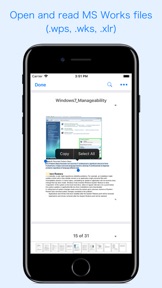
“WPS Reader” allows you to open and read Microsoft Works documents on iOS device. It offers you fantastic reading experience using document outlines, page thumbnails and text search features.
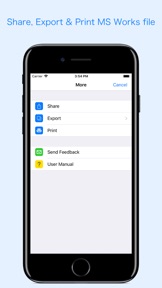
In addition, "WPS Reader" allows you to export Microsoft Works Word processor documents (.wps) into Microsoft Word documents (.docx and .doc), PDF and RTF. Converts Microsoft Works Spreadsheet documents (.wks & .xlr) into Microsoft Excel documents (.xlsx and .xls) and PDF. Converts every Works page into an equivalent page in the resulting Microsoft Office, PDF and rich text conversion into RTF.
Converts the text, text characteristics, paragraphs, text frames linking, text frame columns, tables, graphics and other document objects and properties to the matching Microsoft Office format objects and properties by preserving layout.
- Standard document interaction interface to share, send and save exported documents.
READING FEATURES:
- Fully selectable and searchable text contents. Select and copy text to clipboard for further use.
- Pinch out and Pinch in to ZoomIn and ZoomOut view.
- Navigate through topics by document outlines, if exist.
- Search text feature to find a character, word or sentence any where in a document.
- Scroll through your document by Page Thumbnails or Go to page feature.
DOCUMENT MANAGEMENT
- The inbuilt document browse view automatically gives you the option to share documents using the Share button or a drag-and-drop action. It also provides a standard interface for browsing and managing documents.
- Automatically handles access to iCloud for you within the app. It also provides access to documents managed by third-party storage service extensions installed on your device.
- Browse, find and sort documents to help you locate the document you want. Tap the file that you want to open.
- You can move, delete, duplicate and rename a document with document manager in browser view.
- In the document manager, you can group related documents into folders so they’re easy to find.
Note: “WPS Reader” is standalone application running natively to open and convert Microsoft Works document securely right on your iOS device.
You can refer User Manual for any assistance Or Contact Support.
Microsoft® is a registered trademark of Microsoft Corporation, registered in the U.S. and other countries.
What's New in Version 2.0
- Fully compatible for iOS 14.
- Addressed compatibility issue of Micorosoft Works to DOCX and XLSX converted file with latest Microsoft Office. Now conversion into Microsoft Word (*.docx) and Microsoft Excel (*.xlsx) will create fully compatible document for latest version of Microsoft Office across all platform. No more opening of converted files in Compatible Mode. You can now directly edit converted files without saving a copy from Microsoft Word and Excel.
- Improved font substitution using best match styles for unavailable fonts on device. This will improve look and flow of the document. However, it is highly recommended to install missing fonts for correct layout and appearance.
- Other minor bug fixes and improvements. Thank you all users for your feedback :)
Information
Developer
Categories
Version
2.0
Size
171.4 MB
Game Center
No
VPP Device Licensing
Yes
Rating
Rated: 4+
Compatibility
iOS 11.0 or later
Devices
iPhone 5s, iPhone 6, iPhone 6 Plus, iPhone 6s, iPhone 6s Plus, iPhone SE, iPhone 7, iPhone 7 Plus, iPhone 8, iPhone 8 Plus, iPhone X, iPhone XR, iPhone XS, iPhone XS Max, iPhone 11, iPhone 11 Pro, iPhone 11 Pro Max, iPhone SE (2nd generation), iPhone 12, iPhone 12 Pro, iPhone 12 Pro Max, iPhone 12 mini, iPad (5th Generation) Wi-Fi, iPad (5th Generation) Wi-Fi + Cellular, iPad (6th generation) Wi-Fi, iPad (6th generation) Wi-Fi + Cellular, iPad Pro, iPad Pro (Cellular), iPad Pro (9.7-inch), iPad Pro (9.7-inch) (Cellular), iPad Pro 12.9-inch (2nd generation), iPad Pro 12.9-inch (2nd generation) Wi-Fi + Cellular, iPad Pro (10.5-inch), iPad Pro (10.5-inch) Wi-Fi + Cellular, iPad Pro (11-inch), iPad Pro (11-inch) Wi-Fi + Cellular, iPad Pro 12.9-inch (3rd generation), iPad Pro 12.9-inch (3rd generation) Wi-Fi + Cellular, iPad Air, iPad Air (Cellular), iPad Air 2, iPad Air 2 (Cellular), iPad Air (3rd generation), iPad Air (3rd generation) Wi-Fi + Cellular, iPad mini Retina, iPad mini Retina (Cellular), iPad mini 3, iPad mini 3 (Cellular), iPad mini 4, iPad mini 4 (Cellular), iPad mini (5th Generation), iPad mini (5th Generation) Wi-Fi + Cellular, iPad (7th generation) Wi-Fi + Cellular, iPad Pro 11-inch (2nd generation), iPad Pro 11-inch (2nd generation) Wi-Fi + Cellular, iPad Pro 12.9-inch (4th generation), iPad Pro 12.9-inch (4th generation) Wi-Fi + Cellular, iPad Air (4th Generation) (Wi-Fi), iPad Air (4th Generation) (Wi-Fi + Cellular), iPad (8th generation) Wi-Fi, iPad (8th generation) Wi-Fi + Cellular, iPod touch (6th Generation), iPod touch (7th generation)
Languages
English
App Store: Customer Ratings
Ratings & Reviews
5.0 of 5 (1 Rating)
App Store: Customer Reviews
No Entry