AboutTermsPrivacyContact
 
Updating
Split Lab

Split Lab

Released: 2018-04-22
© (C) 2018 Pengsquare UG (haftungsbeschränkt)
Split Lab - QR Code
Version 1.0
4+
Download on the App Store
Version 1.0
4+
Download on the App Store
Released: 2018-04-22
© (C) 2018 Pengsquare UG (haftungsbeschränkt)

iPhone Screenshots

Screenshot
Screenshot
Screenshot
Screenshot
Screenshot
Screenshot

iPad Screenshots

Screenshot
Screenshot
Screenshot
Screenshot
Screenshot
Screenshot

Description

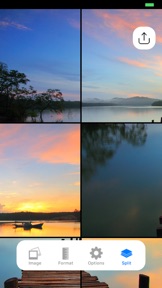
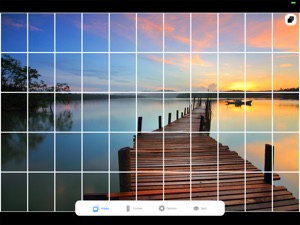
Big photos are great, until you need to print them! Split Lab helps you to create multiple splits fitting to your target format. Make large printouts, plaster your walls - with Split Lab!
Split Lab supports multiple template formats, split strategies and customizable settings.
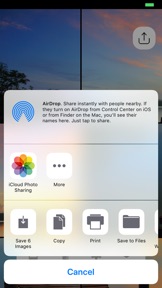
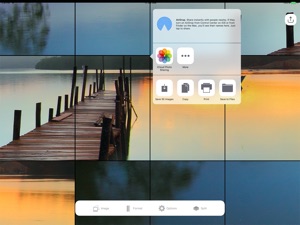
The resulting split images can be shared, saved, printed, stored in your Dropbox or any other option you have on your specific device to handle files.
The power of Split Lab for iOS:
Some years back, we introduced Split Lab to macOS as a powerful tool for professional image splitting and tiling. Now, with the release of Split Lab for iOS, we bring this power to your mobile device.

What's New in Version 1.0

This app has been updated by Apple to use the latest Apple signing certificate.

Seller

Name

Pengsquare UG (haftungsbeschraenkt)

Information

Categories

Version

1.0

Size

0.8 MB

Game Center

No

VPP Device Licensing

Yes

Rating

Rated: 4+

Compatibility

iOS 11.2 or later

Devices

iPhone 5s, iPhone 6, iPhone 6 Plus, iPhone 6s, iPhone 6s Plus, iPhone SE, iPhone 7, iPhone 7 Plus, iPhone 8, iPhone 8 Plus, iPhone X, iPhone XR, iPhone XS, iPhone XS Max, iPhone 11, iPhone 11 Pro, iPhone 11 Pro Max, iPhone SE (2nd generation), iPhone 12, iPhone 12 Pro, iPhone 12 Pro Max, iPhone 12 mini, iPhone 13, iPhone 13 Pro, iPhone 13 Pro Max, iPhone 13 mini, iPad (5th Generation) Wi-Fi, iPad (5th Generation) Wi-Fi + Cellular, iPad (6th generation) Wi-Fi, iPad (6th generation) Wi-Fi + Cellular, iPad Pro, iPad Pro (Cellular), iPad Pro (9.7-inch), iPad Pro (9.7-inch) (Cellular), iPad Pro 12.9-inch (2nd generation), iPad Pro 12.9-inch (2nd generation) Wi-Fi + Cellular, iPad Pro (10.5-inch), iPad Pro (10.5-inch) Wi-Fi + Cellular, iPad Pro (11-inch), iPad Pro (11-inch) Wi-Fi + Cellular, iPad Pro 12.9-inch (3rd generation), iPad Pro 12.9-inch (3rd generation) Wi-Fi + Cellular, iPad Air, iPad Air (Cellular), iPad Air 2, iPad Air 2 (Cellular), iPad Air (3rd generation), iPad Air (3rd generation) Wi-Fi + Cellular, iPad mini Retina, iPad mini Retina (Cellular), iPad mini 3, iPad mini 3 (Cellular), iPad mini 4, iPad mini 4 (Cellular), iPad mini (5th Generation), iPad mini (5th Generation) Wi-Fi + Cellular, iPad (7th generation) Wi-Fi + Cellular, iPad Pro 11-inch (2nd generation), iPad Pro 11-inch (2nd generation) Wi-Fi + Cellular, iPad Pro 12.9-inch (4th generation), iPad Pro 12.9-inch (4th generation) Wi-Fi + Cellular, iPad Air (4th Generation) (Wi-Fi), iPad Air (4th Generation) (Wi-Fi + Cellular), iPad (8th generation) Wi-Fi, iPad (8th generation) Wi-Fi + Cellular, iPad Pro 11-inch (3rd generation), iPad Pro 11-inch (3rd generation) Wi-Fi + Cellular, iPad Pro 12.9-inch (5th Generation), iPad Pro 12.9-inch (5th Generation) Wi-Fi + Cellular, iPad (9th Generation), iPad (9th Generation) Wi-Fi + Cellular, iPad mini (6th Generation), iPad mini (6th Generation) Wi-Fi + Cellular, iPod touch (6th Generation), iPod touch (7th generation)

Languages

English, Chinese, French, German, Italian, Japanese, Korean, Russian, Spanish

App Store: Customer Ratings

Ratings & Reviews

1.5 of 5 (2 Ratings)

App Store: Customer Reviews

2021-02-06

It does not let you choose the final size

It does not let you to choose on how many sheets or how large you want the final project be. I just used the trick to put the image on a corner of a blanck background to get the size I needed; but it leads to a decreased resolution.
npakniyat
Version 1.0
2018-11-17

Meh

Does wha it says... but I can’t resize the image to fit on different amounts of paper. 😕
ChadHarrington
Version 1.0