Updating


iPhone Screenshots


iPad Screenshots
Description
Braina's iOS app allows you to speak commands in your iOS device to remote control your computer! To use voice commands you will also need to install Braina assistant for PC on your computer from this link:
https://www.brainasoft.com/braina/
Braina (Brain Artificial) is an intelligent personal assistant software for Windows PC that has both text to speech and speech to text (speech recognition) features.
What can Braina do?
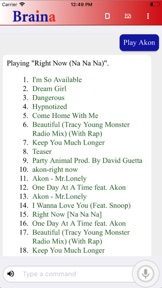
• Play Songs - No need to search songs on your computer. For example just say, Play Hips Don't Lie or Play Akon and Braina will play it for you from anywhere in your computer or even the web.
• Dictate to any Software or Website - Use speech to text feature in third party programs like Microsoft Word using Dictation mode.
• Play Videos - If you want to watch a video or movie, say Play video , for example Play video Godfather.
• Calculator - Do calculations by speaking. - e.g 45 plus 20 minus 10 . Braina can even help you in mathematics.
• Dictionary and Thesaurus - See definition of any word.- e.g. Define encephalon, What is intelligence?
• Open and Close any Programs - e.g. Open notepad, Close notepad
• Open and Search Files and Folders 10 times faster - e.g. Open file studynotes.txt, Search folder program
• Control Powerpoint Presentation - Say next or previous slide (in Dictation mode)
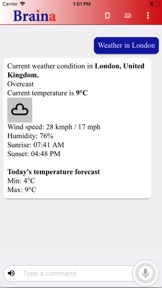
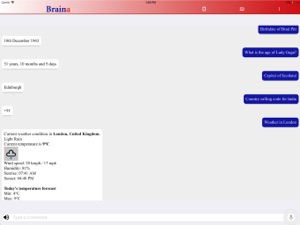
• See News and Weather Information - e.g. Weather in London , Show news about Obama
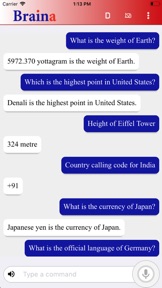
• Search Information on the Internet - e.g. Find information on Thalassemia disease, Search Real Madrid score on Google, Search for Albert Einstein on Wikipedia, Search images of cute puppies
• Set Alarms - e.g. Set alarm at 7:30 am
• Remotely Shutdown Computer
• Notes - Braina can remember notes for you. e.g. Note I have given 550 dollars to John.
and much more..
How to Connect App with PC?
1) Ensure that your PC and iOS device are connected to the same WiFi network. If you don't have a WiFi router, you can also use WiFi Hotspot facility to connect. Also make sure that Braina is running on your PC. You can download Braina for PC from here: http://www.brainasoft.com/braina/
2) Now in order to connect, you will need IP address of your PC on the WiFi network. To get IP, go to Tools menu->Settings->Speech Recognition from Braina on PC. From the "Alternate Speech to Text Option" drop-down select "Braina Smartphone App".
3) You will see a list of IP addresses. Enter the first IP address on the list in iOS App and click connect. If you get an error, then try entering the remaining IP addresses in the list one by one until you get connected. (Note: IP address will generally start with 192.168)
Important: If there are firewalls in your network, the app might not connect successfully with Braina assistant on your computer.
See Frequently Asked Questions for more information: https://www.brainasoft.com/braina/ios/faq.html
What's New in Version 1.0
This app has been updated by Apple to use the latest Apple signing certificate.
Seller
Name
Brainasoft
Information
Developer
Categories
Version
1.0
Size
15.7 MB
Game Center
No
VPP Device Licensing
Yes
Rating
Rated: 4+
Compatibility
iOS 11.0 or later
Devices
iPhone 5s, iPhone 6, iPhone 6 Plus, iPhone 6s, iPhone 6s Plus, iPhone SE, iPhone 7, iPhone 7 Plus, iPhone 8, iPhone 8 Plus, iPhone X, iPhone XR, iPhone XS, iPhone XS Max, iPhone 11, iPhone 11 Pro, iPhone 11 Pro Max, iPhone SE (2nd generation), iPhone 12, iPhone 12 Pro, iPhone 12 Pro Max, iPhone 12 mini, iPhone 13, iPhone 13 Pro, iPhone 13 Pro Max, iPhone 13 mini, iPad (5th Generation) Wi-Fi, iPad (5th Generation) Wi-Fi + Cellular, iPad (6th generation) Wi-Fi, iPad (6th generation) Wi-Fi + Cellular, iPad Pro, iPad Pro (Cellular), iPad Pro (9.7-inch), iPad Pro (9.7-inch) (Cellular), iPad Pro 12.9-inch (2nd generation), iPad Pro 12.9-inch (2nd generation) Wi-Fi + Cellular, iPad Pro (10.5-inch), iPad Pro (10.5-inch) Wi-Fi + Cellular, iPad Pro (11-inch), iPad Pro (11-inch) Wi-Fi + Cellular, iPad Pro 12.9-inch (3rd generation), iPad Pro 12.9-inch (3rd generation) Wi-Fi + Cellular, iPad Air, iPad Air (Cellular), iPad Air 2, iPad Air 2 (Cellular), iPad Air (3rd generation), iPad Air (3rd generation) Wi-Fi + Cellular, iPad mini Retina, iPad mini Retina (Cellular), iPad mini 3, iPad mini 3 (Cellular), iPad mini 4, iPad mini 4 (Cellular), iPad mini (5th Generation), iPad mini (5th Generation) Wi-Fi + Cellular, iPad (7th generation) Wi-Fi + Cellular, iPad Pro 11-inch (2nd generation), iPad Pro 11-inch (2nd generation) Wi-Fi + Cellular, iPad Pro 12.9-inch (4th generation), iPad Pro 12.9-inch (4th generation) Wi-Fi + Cellular, iPad Air (4th Generation) (Wi-Fi), iPad Air (4th Generation) (Wi-Fi + Cellular), iPad (8th generation) Wi-Fi, iPad (8th generation) Wi-Fi + Cellular, iPad Pro 11-inch (3rd generation), iPad Pro 11-inch (3rd generation) Wi-Fi + Cellular, iPad Pro 12.9-inch (5th Generation), iPad Pro 12.9-inch (5th Generation) Wi-Fi + Cellular, iPad (9th Generation), iPad (9th Generation) Wi-Fi + Cellular, iPad mini (6th Generation), iPad mini (6th Generation) Wi-Fi + Cellular, iPod touch (6th Generation), iPod touch (7th generation)
Languages
English
App Store: Customer Ratings
Ratings & Reviews
1.0 of 5 (1 Rating)
App Store: Customer Reviews
No Entry