Updating


iPhone Screenshots




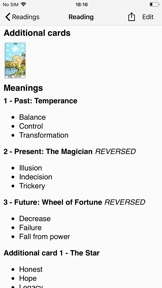
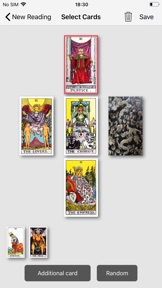

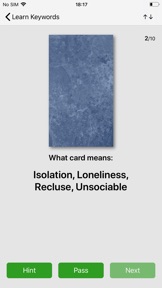

iPad Screenshots
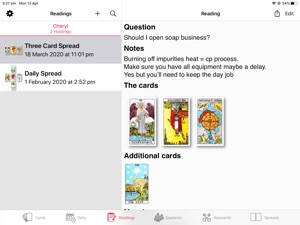




Description
78 card images with keywords gives you the ability to input your own keywords for reference and study.
Easy to use Tarot tool for seasoned Tarot readers.
Log all the information after Tarot reading with querent, quick and easy to email PDF or HTML of your reading.
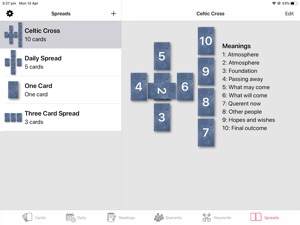
Choice of a selection of built in spreads and notes for customer to keep.
Create your own spreads and edit the meanings of each card in the spreads.
Search for readings by card name, keywords, questions or your notes for the reading.
Edit keywords for each card, upright and reversed
Daily Journal great for seasoned professional readers or people new to the tarot to create personal daily tarot journal. Choice of one card or 5 card daily reading.
Choice of using reversed cards.
"Learn Keywords" lets you run tests to pick cards given a list of keywords to improve your learning of what cards mean.
On iOS 13.4 devices you can add Shortcuts for Siri - you will need to activate the Shortcuts in the Settings view of the Tarot Journal app and you can then ask Siri (even when app is not open) to:
1. Deal a random Tarot Card - ask "Deal Tarot Card"
2. Find Tarot Cards by keyword or name - ask "Find Tarot Card" then when requested give the card name or keyword
3. Start a new Reading - ask "New Tarot Reading"
You have some control over editing how the Readings appear in PDF/HTML when sharing with your Querent.
Great way of keeping in touch with clients for return or future readings.
What's New in Version 2.73
On iPhone the Card Details view now has a thumbnail strip at bottom to navigate through the cards. Force touch/haptic touch on cards on a card in the thumbnail strip to share/create reading/edit keywords
Minor bug fixes
Thank you for all your feedback and reviews. We are grateful for any feedback and ideas for improving this app and will continue to update and improve it.
Seller
Name
Steve Godfrey
Information
Developer
Categories
Version
2.73
Size
37 MB
Game Center
No
VPP Device Licensing
Yes
Rating
Rated: 4+
Compatibility
iOS 11.0 or later
Devices
iPhone 5s, iPhone 6, iPhone 6 Plus, iPhone 6s, iPhone 6s Plus, iPhone SE, iPhone 7, iPhone 7 Plus, iPhone 8, iPhone 8 Plus, iPhone X, iPhone XR, iPhone XS, iPhone XS Max, iPhone 11, iPhone 11 Pro, iPhone 11 Pro Max, iPhone SE (2nd generation), iPad (5th Generation) Wi-Fi, iPad (5th Generation) Wi-Fi + Cellular, iPad (6th generation) Wi-Fi, iPad (6th generation) Wi-Fi + Cellular, iPad Pro, iPad Pro (Cellular), iPad Pro (9.7-inch), iPad Pro (9.7-inch) (Cellular), iPad Pro 12.9-inch (2nd generation), iPad Pro 12.9-inch (2nd generation) Wi-Fi + Cellular, iPad Pro (10.5-inch), iPad Pro (10.5-inch) Wi-Fi + Cellular, iPad Pro (11-inch), iPad Pro (11-inch) Wi-Fi + Cellular, iPad Pro 12.9-inch (3rd generation), iPad Pro 12.9-inch (3rd generation) Wi-Fi + Cellular, iPad Air, iPad Air (Cellular), iPad Air 2, iPad Air 2 (Cellular), iPad Air (3rd generation), iPad Air (3rd generation) Wi-Fi + Cellular, iPad mini Retina, iPad mini Retina (Cellular), iPad mini 3, iPad mini 3 (Cellular), iPad mini 4, iPad mini 4 (Cellular), iPad mini (5th Generation), iPad mini (5th Generation) Wi-Fi + Cellular, iPad (7th generation) Wi-Fi, iPad Pro 11-inch (2nd generation), iPad Pro 11-inch (2nd generation) Wi-Fi + Cellular, iPad Pro 12.9-inch (4th generation), iPad Pro 12.9-inch (4th generation) Wi-Fi + Cellular, iPad Air4, iPad Air4Cellular, iPad EighthGen, iPad EighthGenCellular, iPod touch (6th Generation), iPod touch (7th generation), Apple Watch Series 4
Languages
English
App Store: Customer Ratings
Ratings & Reviews
0.0 of 5 (No rating)
App Store: Customer Reviews
No Entry