Updating


iPhone Screenshots


iPad Screenshots


Description
Switching to a new keyboard is always a painful experience, you spend forever to get used to a new keyboard design that has a different visual experience from your original keyboard that you are already familiar with.
NUMBER ROW KEYBOARD provides a design that looks and behaves exactly like your original keyboard, giving you the same familiar experience with the added functionalities of the number row.
•FASTER
Speed up your typing while using numbers frequently in your data sheets, emails, and technical papers. Save yourself the hassle of switching back and forth between numbers and letters to write a single sentence.
•SCALABLE
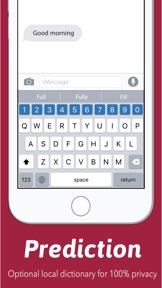
Unlike most of the IOS 3rd party keyboards, number row keyboard comes with an optional prediction bar, giving you the freedom to show/hide the bar and have total control over your screen size.
•FLEXIBLE
Switch to the next keyboard with just one tap, no long press, pop menus, or alert messages while toggling between keyboards.
•EMOJI
Number Row keyboard provides an awesome Emoji shortcut row in your symbols page. You can choose the standard layout and use the top bar just for numbers in all keyboard views or you could choose the Emoji layout and enjoy fast access to Emojis and symbols with just a single tap.
•100% PRIVACY
All the keyboard data is LOCALLY stored. No user input or usage stats are sent to any analytical servers of any kind for a total private and secure experience.
---
Enjoy the awesome experience of using a keyboard that looks like your original keyboard that you’re familiar with. Don’t sacrifice comfort for functionality and have them both with the smartest number keyboard on the App Store.
What's New in Version 1.8
• Prediction bar show/hide feature
• Compatibility with the new iPhone X series
• Compatibility with IOS 12 across all devices
• Emoji bar show/hide feature
• Extra symbols in the standard layout in the symbols page
Information
Developer
Categories
Version
1.8
Size
42.3 MB
Game Center
No
VPP Device Licensing
Yes
Rating
Rated: 4+
Compatibility
iOS 11.0 or later
Devices
iPhone 5s, iPhone 6, iPhone 6 Plus, iPhone 6s, iPhone 6s Plus, iPhone SE, iPhone 7, iPhone 7 Plus, iPhone 8, iPhone 8 Plus, iPhone X, iPhone XR, iPhone XS, iPhone XS Max, iPhone 11, iPhone 11 Pro, iPhone 11 Pro Max, iPhone SE (2nd generation), iPad (5th Generation) Wi-Fi, iPad (5th Generation) Wi-Fi + Cellular, iPad (6th generation) Wi-Fi, iPad (6th generation) Wi-Fi + Cellular, iPad Pro, iPad Pro (Cellular), iPad Pro (9.7-inch), iPad Pro (9.7-inch) (Cellular), iPad Pro 12.9-inch (2nd generation), iPad Pro 12.9-inch (2nd generation) Wi-Fi + Cellular, iPad Pro (10.5-inch), iPad Pro (10.5-inch) Wi-Fi + Cellular, iPad Pro (11-inch), iPad Pro (11-inch) Wi-Fi + Cellular, iPad Pro 12.9-inch (3rd generation), iPad Pro 12.9-inch (3rd generation) Wi-Fi + Cellular, iPad Air, iPad Air (Cellular), iPad Air 2, iPad Air 2 (Cellular), iPad Air (3rd generation), iPad Air (3rd generation) Wi-Fi + Cellular, iPad mini Retina, iPad mini Retina (Cellular), iPad mini 3, iPad mini 3 (Cellular), iPad mini 4, iPad mini 4 (Cellular), iPad mini (5th Generation), iPad mini (5th Generation) Wi-Fi + Cellular, iPad (7th generation) Wi-Fi, iPad Pro 11-inch (2nd generation), iPad Pro 11-inch (2nd generation) Wi-Fi + Cellular, iPad Pro 12.9-inch (4th generation), iPad Pro 12.9-inch (4th generation) Wi-Fi + Cellular, iPad Air4, iPad Air4Cellular, iPad EighthGen, iPad EighthGenCellular, iPod touch (6th Generation), iPod touch (7th generation)
Languages
English
App Store: Customer Ratings
Ratings & Reviews
1.0 of 5 (1 Rating)
App Store: Customer Reviews
No Entry