AboutTermsPrivacyContact
 
Updating
MyMonitor

MyMonitor

Released: 2017-07-19
© Simon Hoss
MyMonitor - QR Code
Version 1.16
4+
Download on the App Store
Version 1.16
4+
Download on the App Store
Released: 2017-07-19
© Simon Hoss

iPhone Screenshots

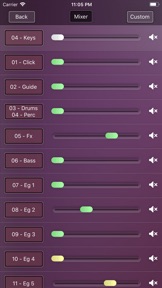
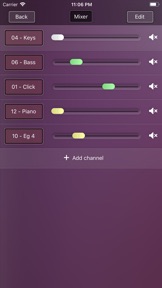
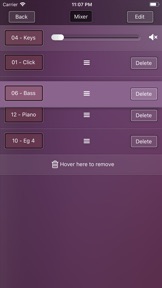
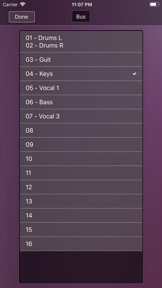
Screenshot
Screenshot
Screenshot
Screenshot
Screenshot
Screenshot

iPad Screenshots

Screenshot
Screenshot
Screenshot
Screenshot
Screenshot

Description

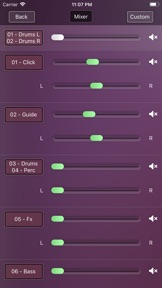
Connect your iPhone or iPad with a digital console and use it as your personal monitor mix
This app only controls the consoles. You will not hear any sound through your device.
Supported consoles:
- Behringer X32
- Behringer XR18 X-Air
- Behringer X18
- Midas M32
- Midas MR18
- Soundcraft UI16
Features:
- The App connects automatically to your console
- Easy mix you stereo monitors
- Supports normal channel, aux channels and effect returns
- Customize your mixer screen
- Switch between multiple consoles
iPad:
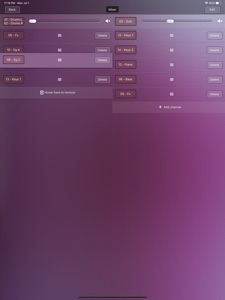
- Mix two monitors parallel
- Supports the iOS splitscreen mode. For Example you can show your chordsheets parallel

What's New in Version 1.16

Bugfix:
- Fixes a problem that the controls disappears when you lay your device down
Feature:
- Adds the possibility to switch between multiple consoles

Seller

Name

Simon Hoss

URL

Information

Developer

Categories

Version

1.16

Size

12.9 MB

Game Center

No

VPP Device Licensing

Yes

Rating

Rated: 4+

Compatibility

iOS 9.0 or later

Devices

iPhone 4S, iPhone 5, iPhone 5c, iPhone 5s, iPhone 6, iPhone 6 Plus, iPhone 6s, iPhone 6s Plus, iPhone SE, iPhone 7, iPhone 7 Plus, iPhone 8, iPhone 8 Plus, iPhone X, iPhone XR, iPhone XS, iPhone XS Max, iPhone 11, iPhone 11 Pro, iPhone 11 Pro Max, iPhone SE (2nd generation), iPad 2 (Wi-Fi), iPad 2 (3G), iPad (3rd Generation) (Wi-Fi), iPad (3rd Generation) (4G), iPad (4th Generation) (Wi-Fi), iPad (4th Generation) (4G), iPad (5th Generation) Wi-Fi, iPad (5th Generation) Wi-Fi + Cellular, iPad (6th generation) Wi-Fi, iPad (6th generation) Wi-Fi + Cellular, iPad Pro, iPad Pro (Cellular), iPad Pro (9.7-inch), iPad Pro (9.7-inch) (Cellular), iPad Pro 12.9-inch (2nd generation), iPad Pro 12.9-inch (2nd generation) Wi-Fi + Cellular, iPad Pro (10.5-inch), iPad Pro (10.5-inch) Wi-Fi + Cellular, iPad Pro (11-inch), iPad Pro (11-inch) Wi-Fi + Cellular, iPad Pro 12.9-inch (3rd generation), iPad Pro 12.9-inch (3rd generation) Wi-Fi + Cellular, iPad Air, iPad Air (Cellular), iPad Air 2, iPad Air 2 (Cellular), iPad Air (3rd generation), iPad Air (3rd generation) Wi-Fi + Cellular, iPad mini (Wi-Fi), iPad mini (4G), iPad mini Retina, iPad mini Retina (Cellular), iPad mini 3, iPad mini 3 (Cellular), iPad mini 4, iPad mini 4 (Cellular), iPad mini (5th Generation), iPad mini (5th Generation) Wi-Fi + Cellular, iPad (7th generation) Wi-Fi + Cellular, iPad Pro 11-inch (2nd generation), iPad Pro 11-inch (2nd generation) Wi-Fi + Cellular, iPad Pro 12.9-inch (4th generation), iPad Pro 12.9-inch (4th generation) Wi-Fi + Cellular, iPad Air4, iPad Air4Cellular, iPad EighthGen, iPad EighthGenCellular, iPod touch (5th generation), iPod touch (6th Generation), iPod touch (7th generation)

Languages

English

App Store: Customer Ratings

Ratings & Reviews

3.0 of 5 (6 Ratings)

App Store: Customer Reviews

2020-01-26

Seems good

It seems to work well until you try to adjust levels or toggle a send on or off...then it doesn’t work. Testing against stock x-32q layout is nice but is not fully functioning
Busse1978
Version 1.15
2018-06-28

Needs to be fixed

The pan and volume glitch and conflict with each other. The app crashes all the time and will not open.
JA10384
Version 1.11