AboutTermsPrivacyContact
 
Updating
Doodle3D Transform

Doodle3D Transform

Released: 2017-09-25
© 2018 Doodle3D
Doodle3D Transform - QR Code
Version 1.7
4+
Download on the App Store
Version 1.7
4+
Download on the App Store
Released: 2017-09-25
© 2018 Doodle3D

iPhone Screenshots

Screenshot
Screenshot
Screenshot
Screenshot
Screenshot

iPad Screenshots

Screenshot
Screenshot
Screenshot
Screenshot
Screenshot

Description

Transform is a simple drawing tool that makes design for 3D modelling and printing accessible to everyone.
By starting with that what we are already familiar: 2D drawing, everybody can create their first 3D design in minutes. Doodle3D Transform automatically transforms your 2D drawing into a 3D object. No specific skills are required to start, so it’s perfect for children and starting designers who want to get up and running with 3D drawing and printing at home or in education. Design a ready-to-print advanced 3D model in minutes with just a handful of tools.
We provide integrations with external services as Sketchfab, so you can share your designs with others or view them in Virtual Reality.
1. Start drawing in the app or import a picture of a drawing you made on paper.
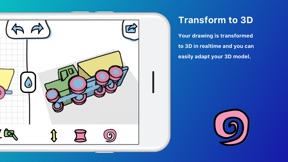
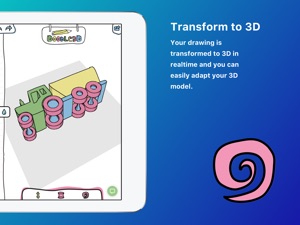
2. Your drawing is transformed to 3D in realtime and you can easily adapt your 3D model.
3. Share your model with others, export it to OBJ or STL or directly 3D print your model.
OUR MISSION
Doodle3D aims to make 3D design and 3D printing accessible to anyone. We offer several products to help you getting started with 3D at school or at home.
Downloading a 3D model is easy, but you cannot always find what you are looking for. Designing 3D models yourself gives you freedom and stimulates creativity and spatial awareness. Most established 3D CAD software is targeted at experts. In the application Doodle3D Transform however, simplicity is key. What makes it stand apart from the many other 3D design applications, is the fact that the user designs 3-dimensional shapes based on flat (2D) drawings. Because of its accessibility, anyone can use this app to create their ideas, no matter their age or background
3D-Print using print.doodle3d.com, 3D Hubs, Shapeways, Polar3D
Share your design on Sketchfab, Thingiverse and MyMiniFactory
Download as .STL, .OBJ, GCODE files, .doodle3d file

What's New in Version 1.7

Changed
- Simplified export menu
Fixed
- Opening photo guide on iOS

Seller

Name

Doodle3D BV

Information

Developer

Categories

Version

1.7

Size

12.1 MB

Game Center

No

VPP Device Licensing

Yes

Rating

Rated: 4+

Compatibility

iOS 12.0 or later

Devices

iPhone 5s, iPhone 6, iPhone 6 Plus, iPhone 6s, iPhone 6s Plus, iPhone SE, iPhone 7, iPhone 7 Plus, iPhone 8, iPhone 8 Plus, iPhone X, iPhone XR, iPhone XS, iPhone XS Max, iPhone 11, iPhone 11 Pro, iPhone 11 Pro Max, iPhone SE (2nd generation), iPhone 12, iPhone 12 Pro, iPhone 12 Pro Max, iPhone 12 mini, iPhone 13, iPhone 13 Pro, iPhone 13 Pro Max, iPhone 13 mini, iPhone SE (3rd generation), iPhone 14, iPhone 14 Plus, iPhone 14 Pro, iPhone 14 Pro Max, iPhone 15, iPhone 15 Plus, iPhone 15 Pro, iPhone 15 Pro Max, iPhone 16, iPhone 16 Plus, iPhone 16 Pro, iPhone 16 Pro Max, iPhone 16e, iPhone 17, iPhone 17 Pro, iPhone 17 Pro Max, iPhone Air, iPad (5th Generation) Wi-Fi, iPad (5th Generation) Wi-Fi + Cellular, iPad (6th generation) Wi-Fi, iPad (6th generation) Wi-Fi + Cellular, iPad Pro, iPad Pro (Cellular), iPad Pro (9.7-inch), iPad Pro (9.7-inch) (Cellular), iPad Pro 12.9-inch (2nd generation), iPad Pro 12.9-inch (2nd generation) Wi-Fi + Cellular, iPad Pro (10.5-inch), iPad Pro (10.5-inch) Wi-Fi + Cellular, iPad Pro (11-inch), iPad Pro (11-inch) Wi-Fi + Cellular, iPad Pro 12.9-inch (3rd generation), iPad Pro 12.9-inch (3rd generation) Wi-Fi + Cellular, iPad Air, iPad Air (Cellular), iPad Air 2, iPad Air 2 (Cellular), iPad Air (3rd generation), iPad Air (3rd generation) Wi-Fi + Cellular, iPad mini Retina, iPad mini Retina (Cellular), iPad mini 3, iPad mini 3 (Cellular), iPad mini 4, iPad mini 4 (Cellular), iPad mini (5th Generation), iPad mini (5th Generation) Wi-Fi + Cellular, iPad (7th generation) Wi-Fi + Cellular, iPad Pro 11-inch (2nd generation), iPad Pro 11-inch (2nd generation) Wi-Fi + Cellular, iPad Pro 12.9-inch (4th generation), iPad Pro 12.9-inch (4th generation) Wi-Fi + Cellular, iPad Air (4th Generation) (Wi-Fi), iPad Air (4th Generation) (Wi-Fi + Cellular), iPad (8th generation) Wi-Fi, iPad (8th generation) Wi-Fi + Cellular, iPad Pro 11-inch (3rd generation), iPad Pro 11-inch (3rd generation) Wi-Fi + Cellular, iPad Pro 12.9-inch (5th Generation), iPad Pro 12.9-inch (5th Generation) Wi-Fi + Cellular, iPad (9th Generation), iPad (9th Generation) Wi-Fi + Cellular, iPad mini (6th Generation), iPad mini (6th Generation) Wi-Fi + Cellular, iPad Air (5th generation), iPad Air (5th generation) Wi-Fi + Cellular, iPad Pro 11-inch (4th generation), iPad Pro 11-inch (4th generation) Wi-Fi + Cellular, iPad Pro 12.9-inch (6th generation), iPad Pro 12.9-inch (6th generation) Wi-Fi + Cellular, iPad (10th generation), iPad (10th generation) Wi-Fi + Cellular, iPad Air 11-inch (M2) Wi-Fi, iPad Air 13-inch (M2) Wi-Fi, iPad Air 13-inch (M2) Wi-Fi + Cellular, iPad Pro 11-inch (M4) Wi-Fi, iPad Pro 11-inch (M4) Wi-Fi + Cellular, iPad Pro 13-inch (M4) Wi-Fi, iPad Pro 13-inch (M4) Wi-Fi + Cellular, iPad mini (A17 Pro) Wi-Fi, iPad mini (A17 Pro) Wi-Fi + Cellular, iPad (A16) Wi-Fi, iPad (A16) Wi-Fi + Cellular, iPad Air 11-inch (M3) Wi-Fi, iPad Air 11-inch (M3) Wi-Fi + Cellular, iPad Air 13-inch (M3) Wi-Fi, iPad Air 13-inch (M3) Wi-Fi + Cellular, iPad Pro 11-inch (M5) Wi-Fi, iPad Pro 11-inch (M5) Wi-Fi + Cellular, iPad Pro 13-inch (M5) Wi-Fi, iPad Pro 13-inch (M5) Wi-Fi + Cellular, iPod touch (6th Generation), iPod touch (7th generation)

Languages

English

App Store: Customer Ratings

Ratings & Reviews

3.5 of 5 (2 Ratings)

App Store: Customer Reviews

2020-12-14

Looks good but crashes

Crashes every time you touch camera icon wish it would of worked
xpissed
Version 1.6
2019-12-28

Worst interface ever

I wanted so badly to like this. There was no free version so I took a chance. After paying the expensive price, I downloaded it for my phone. The app zooms in with no apparent way of zooming out. There are no instructions or tutorials. The icons are cutesy but not intuitive. What a waste of money and disappointment for my kids.
Pickin' & Frownin'
Version 1.6