AboutTermsPrivacyContact
 
Updating
Kronos Workforce Ready Mobile

Kronos Workforce Ready Mobile

Released: 2017-12-17
© 2020 Kronos Inc.
Kronos Workforce Ready Mobile - QR Code
Version 1.70.5
4+
Download on the App Store
Version 1.70.5
4+
Download on the App Store
Released: 2017-12-17
© 2020 Kronos Inc.

iPhone Screenshots

Screenshot
Screenshot
Screenshot
Screenshot
Screenshot

iPad Screenshots

Screenshot
Screenshot
Screenshot
Screenshot
Screenshot

Description

Company Shortname Required! This app requires a company shortname, which is a unique company identifier which you can get from your company administrator.
Tada! The new Workforce Ready mobile app is here! Before you jump in and download it be sure to take a look at the following.
*IMPORTANT MESSAGE FOR NEW USERS*
BEFORE YOU LOGIN - employees and managers:
• If your administrator has not setup the new app for your organization, you will NOT be able to access the app. Please check with your manager or company admin to get access to the new app.
• When logging in you will need to select the region you are using Workforce Ready as well as the Company Shortname (The unique Identification number your company administrator needs to provide to you.)
• After you enter that information you will be prompted to enter in your Company, Username, and Password. If you get stuck on this your COMPANY ADMIN can help you out.
• Companies need to be using approval workflows to process To Do Items.
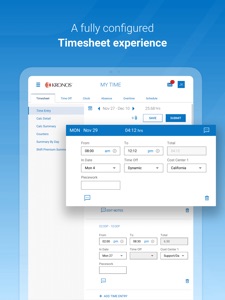
• Supported Timesheet Profiles are Bulk Hours and Start/End (All Days) only.
• Administrator should provide their company’s Short Name to users for login.
Now that you are ready to join Workforce Ready here are some of the awesome things you can do within the app to enhance your human resource needs:
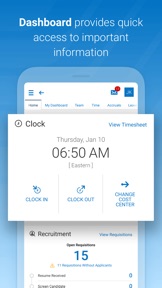
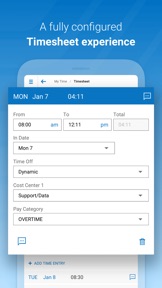
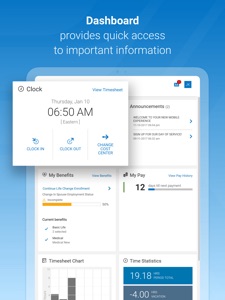
• Check and/or edit your timesheets for accuracy
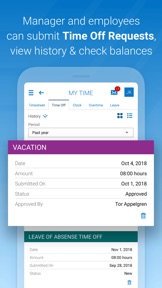
• Submit and view time off requests
• Check vacation/sick balances
• Enroll in benefits and view existing benefits
• Check your schedule
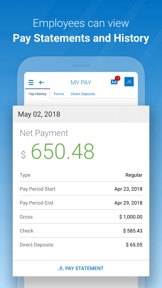
• View pay stubs
This app is available for both employees and managers. Your employer must have Kronos Workforce Ready software configured for mobile use.
Key things to know as an administrator:
Users need to have permission to access the new app via their security profile. Click here to learn how to enable this for your employees: https://community.kronos.com/s/article/How-to-enable-and-configure-the-new-mobile-app. Note, you must be logged into the Kronos Community to view this article

What's New in Version 1.70.5

This release includes:
• SMS two-way support (through Twilio)
• Minor bug fixes
• Specific product enhancements (available in both desktop and mobile)

Seller

Name

Kronos Incorporated

URL

Information

Categories

Version

1.70.5

Size

18.4 MB

Game Center

No

VPP Device Licensing

Yes

Rating

Rated: 4+

Compatibility

iOS 11.0 or later

Devices

iPhone 5s, iPhone 6, iPhone 6 Plus, iPhone 6s, iPhone 6s Plus, iPhone SE, iPhone 7, iPhone 7 Plus, iPhone 8, iPhone 8 Plus, iPhone X, iPhone XR, iPhone XS, iPhone XS Max, iPhone 11, iPhone 11 Pro, iPhone 11 Pro Max, iPhone SE (2nd generation), iPad (5th Generation) Wi-Fi, iPad (5th Generation) Wi-Fi + Cellular, iPad (6th generation) Wi-Fi, iPad (6th generation) Wi-Fi + Cellular, iPad Pro, iPad Pro (Cellular), iPad Pro (9.7-inch), iPad Pro (9.7-inch) (Cellular), iPad Pro 12.9-inch (2nd generation), iPad Pro 12.9-inch (2nd generation) Wi-Fi + Cellular, iPad Pro (10.5-inch), iPad Pro (10.5-inch) Wi-Fi + Cellular, iPad Pro (11-inch), iPad Pro (11-inch) Wi-Fi + Cellular, iPad Pro 12.9-inch (3rd generation), iPad Pro 12.9-inch (3rd generation) Wi-Fi + Cellular, iPad Air, iPad Air (Cellular), iPad Air 2, iPad Air 2 (Cellular), iPad Air (3rd generation), iPad Air (3rd generation) Wi-Fi + Cellular, iPad mini Retina, iPad mini Retina (Cellular), iPad mini 3, iPad mini 3 (Cellular), iPad mini 4, iPad mini 4 (Cellular), iPad mini (5th Generation), iPad mini (5th Generation) Wi-Fi + Cellular, iPad (7th generation) Wi-Fi, iPad Pro 11-inch (2nd generation), iPad Pro 11-inch (2nd generation) Wi-Fi + Cellular, iPad Pro 12.9-inch (4th generation), iPad Pro 12.9-inch (4th generation) Wi-Fi + Cellular, iPod touch (6th Generation), iPod touch (7th generation)

Languages

English, Dutch, French, Spanish

App Store: Customer Ratings

Ratings & Reviews

3.5 of 5 (84 Ratings)

App Store: Customer Reviews

2020-07-08

Horrible.

Since the last update this App has NOT worked properly. When our accounting team brought this to their attention they said they were looking into it, that was 3 weeks ago.
We have well over 100 employees using this app who have multiple entry’s in a day for services, when they add a second, third or forth entry, it over writes all the other daily entry’s and puts it all in one grouping. Needless to say this is pathetic and not worth using. They need to fix this, we are all extremely fed up with their poor response on fixing it.
09879098
Version 1.69.3
2020-04-21

Love it!

Great way to check my schedule
mujiga
Version 1.67.6
2019-06-11

This thing is worthless

I have been using this app for my current job. And what I don’t like is that you can’t edit or delete the timesheet. I mean seriously. Hey people who created this app, let us have the opportunity to edit our timesheets unless you’re too stupid to do it.
Hero9055
Version 1.62.2