AboutTermsPrivacyContact
 
Updating
Treadmill Smart Speed

Treadmill Smart Speed

Released: 2017-01-26
© AppyAppster Limited
Treadmill Smart Speed - QR Code
Version 1.43
4+
Download on the App Store
Version 1.43
4+
Download on the App Store
Released: 2017-01-26
© AppyAppster Limited

iPhone Screenshots

Screenshot
Screenshot
Screenshot
Screenshot

Description

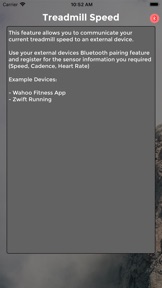
Treadmill Smart Speed is design to communicate your Treadmill Running Speed from you iPhone or Watch to a receiving devices. It used the same Bluetooth communications protocols as expensive running footpods.
You choose your preferred Speed Input:
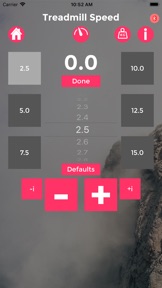
1 - Select the speed your treadmill is moving on the app and this is transmitted via bluetooth to your receiver. (This is my personal recommendation)
2 - Attach the iPhone security to yourself and run. The iPhone's motion sensor will estimate your speed and transmit this to your bluetooth receiver.
****** iPhone 5S and above. ***** (fully dependant on accuracy of iPhone)
*****THIS OPTION WILL BE DISCONTINUED IN FUTURE VERSIONS, PLEASE RELY ON TREADMILL MODE OR WATCH MODE
3 - Use your phone in combination with your Apple Watch. The Watch will send Speed, Cadence and Heart Rate via your phone and transmit these to your bluetooth receiver. (Watch workouts can be saved as part of your daily activity rings) (fully dependant on accuracy of Watch)
*New Feature :you can control the speed manually using the crown, simply tap the digital speed to enable/disable.
Notes:
• TSS Watch Module - requires an Apple Watch to calculate Heart Rate, Cadence and Speed data.
• TSS Watch Module integrates with the Health App on your iPhone to contribute to your Activity Rings. It will request permission to access the relevant data types associated with a workout.
*Connection to MAC Requires BLE 4.0 -
The Mac mini , MacBook Air were both updated with Bluetooth 4.0 support in 2011.
The MacBook Pro Mac 2012.
The Mac Pro in December 2013.

What's New in Version 1.43

Minor update

Seller

Name

AppyAppster Limited

URL

Information

Categories

Version

1.43

Size

37 MB

Game Center

No

VPP Device Licensing

Yes

Rating

Rated: 4+

Compatibility

iOS 10.0 or later

Devices

iPhone 5, iPhone 5c, iPhone 5s, iPhone 6, iPhone 6 Plus, iPhone 6s, iPhone 6s Plus, iPhone SE, iPhone 7, iPhone 7 Plus, iPhone 8, iPhone 8 Plus, iPhone X, iPhone XR, iPhone XS, iPhone XS Max, iPhone 11, iPhone 11 Pro, iPhone 11 Pro Max, iPhone SE (2nd generation), iPod touch (6th Generation), iPod touch (7th generation), Apple Watch Series 4

Languages

English

App Store: Customer Ratings

Ratings & Reviews

2.5 of 5 (5 Ratings)

App Store: Customer Reviews

2020-04-17

As advertised

Works perfectly
WTM88
Version 1.43
2019-04-18

Wont update on iPad

Used to work great, new update won’t allow it to update on iPad Pro
Steve Nizzero
Version 1.32
2019-03-08

No data transmitted

Appears to link however no data is transmitted to Zwift. Figured it would be a cheap fix until I get an actual pod, wish I had saved the money.
31282
Version 1.32
2019-02-10

Doesn’t Work

Everything pairs up fine but no data transmitted, waste of money
FreddyBeachPaleo
Version 1.32
2018-02-14

Didn’t work and no refund

App did not work and did not refund. Wow good job!
atila paes
Version 1.30
2017-03-06

Doesn't work.

Will not pair with Zwift so I just lost 7$ and half an hour of my life.
AaAunhappy-
Version 1.30