AboutTermsPrivacyContact
 
Updating
Miro: collaborative whiteboard

Miro: collaborative whiteboard

Released: 2017-01-03
© 2011 RealtimeBoard Inc.
Miro: collaborative whiteboard - QR Code
Version 3.6.19
4+
Download on the App Store
Version 3.6.19
4+
Download on the App Store
Released: 2017-01-03
© 2011 RealtimeBoard Inc.

iPhone Screenshots

Screenshot
Screenshot
Screenshot
Screenshot
Screenshot
Screenshot

iPad Screenshots

Screenshot
Screenshot
Screenshot
Screenshot
Screenshot

Description

Miro is the online collaborative whiteboard platform that enables distributed teams to work effectively together, from brainstorming with digital sticky notes to planning and managing agile workflows.
It provides basic functionality for the iPhone and full-featured app for the iPad.
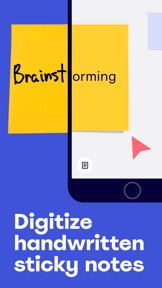
Using these mobile apps you can easily digitize handwritten sticky notes, add them to an online whiteboard, invite your team to collaborate just like on a physical whiteboard, upload images, docs, spreadsheets, and more to an infinite canvas.
With a whiteboard in your pocket, you can quickly access collaboration right on the go. Capture ideas or share feedback on projects, wireframes, and designs wherever you are.
Miro includes all the following features:
- Create, view, and edit your boards
- Capture and organize your ideas on the go
- Convert pen drawings into accurate shapes, sticky notes, and connector lines
- Convert sticky notes from a physical whiteboard into editable digital stickies with a single photo
- Share boards publicly or invite team members to edit
- Upload images, pictures, docs, spreadsheets, and more
- Draw on or annotate mockups, images, or documents
- Demo boards directly from your iPhone or iPad
- Read, add, or resolve comments
- Search for content inside boards
Whether you’re using Miro for brainstorming, design thinking, Agile or Scrum rituals, user journey mapping, product requirements, UX flows or process flows, or user personas, the platform enables your team to use an infinite canvas to transform your physical whiteboard into a digital whiteboard.
GET IN TOUCH
Any questions or comments? Use feedback form to get in touch with us https://help.miro.com/hc/en-us/requests/new?referer=store
We'll be happy to help!

What's New in Version 3.6.19

New:
• Now you can sign in to Miro with Apple ID.
Fixed:
• Fixed the issue where @-mention button in comments sometimes disappeared after the first mention.
• Before, when users tried sharing board via Slack, the board link would get pasted to the Slack message twice. Well, not anymore!

Seller

Name

Realtimeboard Inc.

Information

Categories

Version

3.6.19

Size

39.8 MB

Game Center

No

VPP Device Licensing

Yes

Rating

Rated: 4+

Compatibility

iOS 9.0 or later

Devices

iPhone 4S, iPhone 5, iPhone 5c, iPhone 5s, iPhone 6, iPhone 6 Plus, iPhone 6s, iPhone 6s Plus, iPhone SE, iPhone 7, iPhone 7 Plus, iPhone 8, iPhone 8 Plus, iPhone X, iPhone XR, iPhone XS, iPhone XS Max, iPhone 11, iPhone 11 Pro, iPhone 11 Pro Max, iPhone SE (2nd generation), iPad 2 (Wi-Fi), iPad 2 (3G), iPad (3rd Generation) (Wi-Fi), iPad (3rd Generation) (4G), iPad (4th Generation) (Wi-Fi), iPad (4th Generation) (4G), iPad (5th Generation) Wi-Fi, iPad (5th Generation) Wi-Fi + Cellular, iPad (6th generation) Wi-Fi, iPad (6th generation) Wi-Fi + Cellular, iPad Pro, iPad Pro (Cellular), iPad Pro (9.7-inch), iPad Pro (9.7-inch) (Cellular), iPad Pro 12.9-inch (2nd generation), iPad Pro 12.9-inch (2nd generation) Wi-Fi + Cellular, iPad Pro (10.5-inch), iPad Pro (10.5-inch) Wi-Fi + Cellular, iPad Pro (11-inch), iPad Pro (11-inch) Wi-Fi + Cellular, iPad Pro 12.9-inch (3rd generation), iPad Pro 12.9-inch (3rd generation) Wi-Fi + Cellular, iPad Air, iPad Air (Cellular), iPad Air 2, iPad Air 2 (Cellular), iPad Air (3rd generation), iPad Air (3rd generation) Wi-Fi + Cellular, iPad mini (Wi-Fi), iPad mini (4G), iPad mini Retina, iPad mini Retina (Cellular), iPad mini 3, iPad mini 3 (Cellular), iPad mini 4, iPad mini 4 (Cellular), iPad mini (5th Generation), iPad mini (5th Generation) Wi-Fi + Cellular, iPad (7th generation) Wi-Fi + Cellular, iPad Pro 11-inch (2nd generation), iPad Pro 11-inch (2nd generation) Wi-Fi + Cellular, iPad Pro 12.9-inch (4th generation), iPad Pro 12.9-inch (4th generation) Wi-Fi + Cellular, iPod touch (5th generation), iPod touch (6th Generation), iPod touch (7th generation)

Languages

English

App Store: Customer Ratings

Ratings & Reviews

3.5 of 5 (17 Ratings)

App Store: Customer Reviews

2020-07-13

Miro excellent

Great job , Thank you Miro
Omid omidi
Version 3.6.16
2020-06-08

Not bad but could be better

Needs better Apple Pencil and touch screen support.
When in drawing mode, pencil and finger shouldn’t be able to draw at the same time.
There should also be a easy “view” mode where I don’t move lines everywhere.
I have more suggestions, feel free to contact me for more.
I hope you see this and make some changes, then it’ll be 5 star.
sinot
Version 3.6.14
2020-06-03

This doesn’t work

I signed in to the app then it said it will send a verification code but it didn’t I kept clicking send code again but it nothing I would rather use zoom white bored then this
try to find the m
Version 3.6.13
2019-01-23

Very good and responsive

This app is much better than MS whiteboard, and a lot more responsive. Good job, please keep adding more features.
Why is there a monthly subscription fee for a single user? It doesn’t make sense. For group usage / corporate use I get why there is an ongoing licensing fee, but the fee should NOT apply for a single user. If you take care of that, I will purchase, recommend the tool and give it 5 *.
humble-user
Version 2.7.10
2018-11-25

Almost Perfect

I love the app, great work guys!
I would love to have pressure sensitivity with the Apple Pencil.
maximeroz
Version 2.7.9
2018-05-21

Awesome

The ability to capture handwritten stickies by taking a photo of them and having the app separate them and bring them onto your board is worth 5 stars alone.
Chitostyle
Version 2.5.3
2017-12-05

Great app for whiteboard

Easy to use, nice features.
It will be perfect, If you can add the video and audio chat on a ios device.
Louisinca
Version 2.3.7
2017-11-13

Great on the web, need an iPad app

Hi, I love your product, nice and easy to use, can you please release an iPad app? This app suits the screen format of the iPad much better than an iPhone screen. Thanks!
Spock
Version 2.3.5
2017-01-20

Poor start

Great product but if all you can do is leave a comment and not edit board from iOS device its of no use really. I'll keep looking for other options and not spend any money with them until they catch up.
PrivateParts
Version 1.0