Updating


+2
#10 in Top Free iPad Apps > Graphics & Design
+1
#25 in Top Grossing iPad Apps > Graphics & Design
iPhone Screenshots



iPad Screenshots




Description
Drawings is a cool doodling app that allows you to draw, sketch, doodle while you are traveling or just relaxing a home!
**Kids Doodle** (NEW)
- Creative Kids Doodle brings to life your unique designing experience
- 10+ unique canvas backgrounds that you can change while drawing.
- You can record your drawing on canvas as a video and share it with your friends
- Beautiful preset color palettes: choose one that fits best and fill a picture with colors from soft and muted to bold and lively
- Apple Pencil support: enjoy an easy and intuitive process of coloring on the crisp screen of iPad Pro.
1. Doodle Desk!
Are you a Doodle Lover? - Yes!
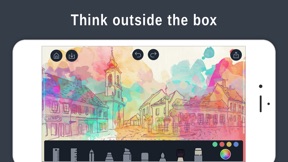
Unleash your creativity and create amazing Doodles with getting Drawing Pad. Create beautiful Doodles with different tools like 3D brushes, stickers, stamps and so on.
Want to show you doodling skills to your friends/family? Share it on social media platforms like Facebook or Instagram.
No happy with your Doodle? Want to give a perfect finishing touch?
Drawing Pad comes with smooth erasing, undo, redo & specific brushes for a perfect Doodle.
2. Sketch Desk!
You love sketching, but cannot carry your sketchbook, everywhere?
Don’t worry install Drawing Pad in your iPhone/iPad and sketch while on a go!
You can create beautiful sketches with various brush tools like as pen, pencil, highlighter & so on.
Also, you can pick up your favorite colors from the quick colors tool.
With options like Undo, Redo and flexible eraser, you can create that perfect sketch.
3. Photo Desk for Creative Editors
Are you an artist who also creates beautiful effects for your photos?
Drawing Pad comes with Magic brush stroke effects. This allows you to add more liveliness to your photos.
Moreover, beautify your photos with a collection of attractive stamps & stickers, vibrant frames, & a cropping tool.
You can import photos from Facebook, Instagram, Flickr, & other networks.
Export your ArtWork :-
You can export your sketches, drawings, & doodles to other physical products like Phone cases, Posters, Cushions, Frames, & many more.
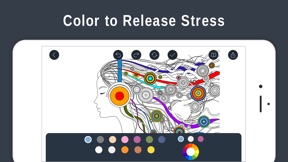
4. Coloring Book
- Creative coloring book brings to life your unique designing experience
- 10+ categories of unique coloring pages from talented illustrators - with frequent collection updates you’ll always have something new to color
- Custom palettes: combine any colors you like to create a matchless work of art
Drawing Pad app is always easy to use, but you can enjoy even more powerful drawing features with the auto-renewed subscription.
Subscription Terms for Drawing Premium
• Length of subscription: Month
• Introductory Trial: 3 Days free trial
• Price of subscription: 3 Day Free Trial then $8.99 / month or 3 Day Free Trial then $0.99 / week or 3 Day Free Trial then $49.99 / year
• Payment will be charged to iTunes Account at confirmation of purchase
• The account will be charged for renewal within 24-hours prior to the end of the current period, & identify the cost of the renewal
• Subscriptions may be managed by the user & auto-renewal may be turned off by going to the user's Account Settings after purchase
• Subscription automatically renews unless auto-renew is turned off at least 24-hours before the end of the current period
• Any unused portion of a free trial period, if offered, will be forfeited when the user purchases a subscription to that publication, where applicable.
• Subscriptions will be charged to your credit card through your iTunes account. Your subscription will automatically renew unless canceled at least 24 hours before the end of your current subscription, & you can cancel a subscription during the active period. You can manage your subscription at any time, either by viewing your account in iTunes from your Mac or PC or Account Settings on your device after purchase.
Privacy Policy: https://drawingsdesk.com/privacy-policy/
Terms of Use: https://drawingsdesk.com/terms-of-use/
What's New in Version 5.5
- Small Bugs Fixes
Information
Developer
Categories
Version
5.5
Size
280 MB
Game Center
No
VPP Device Licensing
Yes
Rating
Rated: 4+
Compatibility
iOS 10.0 or later
Devices
iPhone 5, iPhone 5c, iPhone 5s, iPhone 6, iPhone 6 Plus, iPhone 6s, iPhone 6s Plus, iPhone SE, iPhone 7, iPhone 7 Plus, iPhone 8, iPhone 8 Plus, iPhone X, iPhone XR, iPhone XS, iPhone XS Max, iPhone 11, iPhone 11 Pro, iPhone 11 Pro Max, iPhone SE (2nd generation), iPad (4th Generation) (Wi-Fi), iPad (4th Generation) (4G), iPad (5th Generation) Wi-Fi, iPad (5th Generation) Wi-Fi + Cellular, iPad (6th generation) Wi-Fi, iPad (6th generation) Wi-Fi + Cellular, iPad Pro, iPad Pro (Cellular), iPad Pro (9.7-inch), iPad Pro (9.7-inch) (Cellular), iPad Pro 12.9-inch (2nd generation), iPad Pro 12.9-inch (2nd generation) Wi-Fi + Cellular, iPad Pro (10.5-inch), iPad Pro (10.5-inch) Wi-Fi + Cellular, iPad Pro (11-inch), iPad Pro (11-inch) Wi-Fi + Cellular, iPad Pro 12.9-inch (3rd generation), iPad Pro 12.9-inch (3rd generation) Wi-Fi + Cellular, iPad Air, iPad Air (Cellular), iPad Air 2, iPad Air 2 (Cellular), iPad Air (3rd generation), iPad Air (3rd generation) Wi-Fi + Cellular, iPad mini Retina, iPad mini Retina (Cellular), iPad mini 3, iPad mini 3 (Cellular), iPad mini 4, iPad mini 4 (Cellular), iPad mini (5th Generation), iPad mini (5th Generation) Wi-Fi + Cellular, iPad (7th generation) Wi-Fi, iPad Pro 11-inch (2nd generation), iPad Pro 11-inch (2nd generation) Wi-Fi + Cellular, iPad Pro 12.9-inch (4th generation), iPad Pro 12.9-inch (4th generation) Wi-Fi + Cellular, iPod touch (6th Generation), iPod touch (7th generation), Apple Watch Series 4
Languages
English
App Store: Customer Ratings
Ratings & Reviews
4.0 of 5 (4,628 Ratings)
App Store: Customer Reviews
No Entry