Description
A dream calculator of the 70's, priced at $1,900 in today's dollars, now on your iPhone!
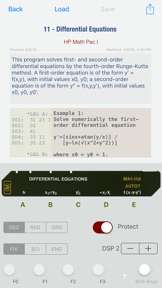
RPN-67 SD is the iPhone version of RPN-67 Pro, the first complete simulation of Hewlett-Packard's legendary HP-67 programmable calculator for the iPad. Produced from 1976 to 1982, the HP-67 was a huge success among scientists, engineers and other professionals. Thousands of programs were written for it. Now you can run them right on your iPhone, with more ease and faster than ever before. To get you started quickly, run the built-in program cards, or choose from the large number of programs available as free downloads from our website.
What users said:
“This version permits you to use your virtual HP-67 just as you could the original - hand held and highly portable. Congratulations to the developer for providing such an excellent and aesthetically pleasing software product."
"This was my first scientific calculator in real life. It is great to have the simulator on my iPhone. The special features added make it into a HP-41 or 42S! It comes packaged with some great samples. Am having great fun with it."
Features:
• Virtual program and data cards
• Virtual paper tape printer supports all HP-97 printer modes
• Powerful database-driven card manager
• Create, label, and organize a virtually unlimited number of cards
• Use iTunes to effortlessly save entire card collections on your Mac/PC
• Sharing: e-mail, AirDrop, Dropbox, copy, paste, print
• Editable listing shows labels, targets of branches, and errors
• E-mail listings and let the recipient paste the text right into RPN-67
• Print listings on any AirPrint-compatible printer
• Program listing on paper tape shows subroutine nesting
• Edit paper tape
• E-mail paper tape, or print it via AirPrint
• Cut/copy/paste displayed value or program steps
• Paste existing HP-67 listings into RPN-67 SD and run them
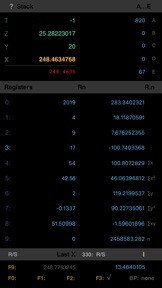
• "Live" display of stack, memory registers, flags
• Show and edit program instructions
• Fast: 1.5 secs vs. 6 mins (iPhone 6 vs. HP-67, determinant of 5x5 matrix)
• Low-battery indicator (iPhone charge 10% or less)
• Optional high-contrast mode for working in bright ambient light
• Compatible with RPN-67 Pro and RPN-97 Pro
While RPN-67 SD works like a real HP-67, changing a simple setting will turn the app into a super-charged HP-67:
• Up to 999 program steps, 8 subroutine levels, 6 additional flags (F4...F9)
• 100 additional registers
• 100 additional labels
• 100 built-in constants and conversions
• More than 150 additional powerful operations and functions
Plus:
• 15 commands to print and manipulate any range of extended registers
• Unrestricted register arithmetic
• Exchange x with any register
• Complex numbers, hyperbolic functions
• Non-volatile memory - stack, registers, program, flags, paper tape
• Status indicators for prefix keys (f, g, h, STO, RCL, etc.)
• Display showing thousands separators (optional)
• Text output on simulated paper tape in 10 colors, even simple plotting
• Stack-of-stack: push/pop the entire stack on internal stack (4 levels)
• Single-step into subroutines (optional)
• Powerful debugging aids, including 10 breakpoints with counters
• Keycodes translated to command names while entering or single-stepping a program
• Change the duration of the PAUSE command
• Compress constants in programs into a single step (reversible)
RPN-67 SD comes with more than 130 programs pre-installed, including HP Standard Pac, HP Business Decisions Pac, HP Math Pac I, HP Stat Pac I, and HP Surveying Pac I.
The simulator has been verified to correctly run the examples given in HP Civil Engineering Pac I, HP Clinical Lab Pac, HP E.E. Pac I, HP Games Pac I, HP M.E. Pac I, HP Navigation Pac I, as well as large number of programs published in Users' Library Solutions.
For more information and free program downloads visit the RPN-67 website: cuveesoft.ch/rpn67