AboutTermsPrivacyContact
 
Updating
Soundboard Studio

Soundboard Studio

Released: 2016-05-05
© JoeAllenPro Limited
Soundboard Studio - QR Code
Version 2.3.2
4+
Download on the App Store
Version 2.3.2
4+
Download on the App Store
Released: 2016-05-05
© JoeAllenPro Limited

iPhone Screenshots

Screenshot
Screenshot
Screenshot
Screenshot
Screenshot
Screenshot
Screenshot
Screenshot
Screenshot

iPad Screenshots

Screenshot
Screenshot
Screenshot
Screenshot
Screenshot
Screenshot
Screenshot
Screenshot
Screenshot

Description

Soundboard Studio is the professional and smart sound playback app, perfect for for music, sound effects, voiceovers, pads, soundbites or anything else!
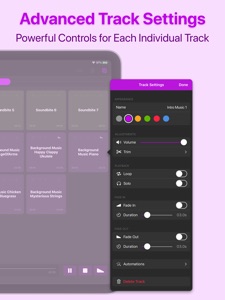
Soundboard Studio is designed for playing ad-lib sounds and music, with its large grid of buttons for each of your tracks. You can customise the layout, colours and detailed settings for all of your tracks.
For years, Soundboard Studio has been the app of choice for many pro podcasters, studios, event venues and more. Here's just a few of their thoughts:
• “For the price it knocks everything else out of the ring that compares to work on a tablet or laptop.”
• “For me, this is the best of any program out there, and I’ve tried a lot.”
• “My worship Live looping is in a whole new Level! Thank you guys!”
• “This app is professional grade and made for—you guessed it—professionals! You won't regret this investment.”
• “Podcasters, look no further: This is your soundboard app!”
• “This is for serious professionals, so if that's you, add this app to your arsenal immediately.”
Top Features:
• Play multiple tracks simultaneously
• Set tracks to fade in and/or fade out
• Set individual volume levels for each track
• Trim the start and end of individual tracks
• Set tracks to automatically play the next adjacent track when they reaches their end
• Monitor and control multiple playing tracks
• Add images to your tracks to make them instantly recognisable
• Create multiple 'Boards' of tracks and quickly navigate between them
• Assign default track settings to apply to all newly imported tracks
• Import tracks from the Music library on your device
• Import audio files from your favourite apps and services like Dropbox, Google Drive, iCloud Drive and more via the Files app
• Use iTunes File Sharing to import files directly from your computer
• Drag & drop support – Drag any compatible audio files into Soundboard Studio
• See which tracks you have already played
• Low latency playback using the power and simplicity of iOS
• Colours! Select from 6 colours for your tracks and boards
• Collapsible view of all playing tracks for better control
• Easy drag & drop track arrangement
• Move tracks between boards
• Import multiple files at once from the Files app
• iPad split-screen multitasking support
• iPad slide-over multitasking support
Upgrade to Pro for extra features including:
• Create unlimited boards (limited to 4 boards without Pro)
• Add unlimited tracks (limited to 24 tracks without Pro)
• Background audio playback: Your tracks will continue playing when you close the app
• Add images to your tracks to easily identify them at a glance
• Program smart Track Automations to trigger events such as playing other tracks, or changing other track volumes
• Connect your device to an external display and chose from three realtime visualisers fo your sound
Soundboard Studio was designed to be perfect for...
• Podcasts
• Events
• Live theatre
• Church services
• Workshops
• Voice presenters
• Wedding planners
• Choreographers
• Stage Managers
• Magicians
• Puppeteers
• Dance recitals
Information about Soundboard Studio Pro:
Soundboard Studio Pro is available as a subscription or a one-time purchase.
If you subscribe to one of the subscription options, your subscription will start with a 7-day free trial. Your subscription will be applied to your iTunes account at the end of the trial.
Subscriptions will automatically renew unless canceled within 24-hours before the end of the current period. You can cancel anytime in the Settings menu in Soundboard Studio, or from your iTunes account settings. Any unused portion of a free trial will be forfeited if you purchase a subscription. For more information, go to soundboardstudio.com/terms
You can also upgrade to Pro without a subscription with a one-time purchase.
No other soundboard app comes close to the versatility, usability and experience of Soundboard Studio.

What's New in Version 2.3.2

• Small bug fixes and UI improvements
Also new in version 2.3:
• New interface
• New more flexible upgrade options with more affordable pricing
• Colours: Select from 6 colours for your tracks and boards
• Collapsible view of all playing tracks for better control
• Easier drag & drop track arrangement
• Move tracks between boards
• Import multiple files at once
• Drag & drop support – Drag any compatible audio files into Soundboard Studio to quickly import them as tracks
• iPad split-screen multitasking support
• iPad slide-over multitasking support

Seller

Name

JoeAllenPro Limited

Information

Categories

Version

2.3.2

Size

3.8 MB

Game Center

No

VPP Device Licensing

Yes

Rating

Rated: 4+

Compatibility

iOS 11.0 or later

Devices

iPhone 5s, iPhone 6, iPhone 6 Plus, iPhone 6s, iPhone 6s Plus, iPhone SE, iPhone 7, iPhone 7 Plus, iPhone 8, iPhone 8 Plus, iPhone X, iPhone XR, iPhone XS, iPhone XS Max, iPhone 11, iPhone 11 Pro, iPhone 11 Pro Max, iPhone SE (2nd generation), iPad (5th Generation) Wi-Fi, iPad (5th Generation) Wi-Fi + Cellular, iPad (6th generation) Wi-Fi, iPad (6th generation) Wi-Fi + Cellular, iPad Pro, iPad Pro (Cellular), iPad Pro (9.7-inch), iPad Pro (9.7-inch) (Cellular), iPad Pro 12.9-inch (2nd generation), iPad Pro 12.9-inch (2nd generation) Wi-Fi + Cellular, iPad Pro (10.5-inch), iPad Pro (10.5-inch) Wi-Fi + Cellular, iPad Pro (11-inch), iPad Pro (11-inch) Wi-Fi + Cellular, iPad Pro 12.9-inch (3rd generation), iPad Pro 12.9-inch (3rd generation) Wi-Fi + Cellular, iPad Air, iPad Air (Cellular), iPad Air 2, iPad Air 2 (Cellular), iPad Air (3rd generation), iPad Air (3rd generation) Wi-Fi + Cellular, iPad mini Retina, iPad mini Retina (Cellular), iPad mini 3, iPad mini 3 (Cellular), iPad mini 4, iPad mini 4 (Cellular), iPad mini (5th Generation), iPad mini (5th Generation) Wi-Fi + Cellular, iPad (7th generation) Wi-Fi + Cellular, iPad Pro 11-inch (2nd generation), iPad Pro 11-inch (2nd generation) Wi-Fi + Cellular, iPad Pro 12.9-inch (4th generation), iPad Pro 12.9-inch (4th generation) Wi-Fi + Cellular, iPod touch (6th Generation), iPod touch (7th generation)

Languages

English

App Store: Customer Ratings

Ratings & Reviews

4.5 of 5 (116 Ratings)

App Store: Customer Reviews

2020-08-05

I ACTUALLY LOVE IT

This app is actually really good. I’m still trying to figure out the app but I’m getting there.
Suggestion: add the option where we can increase the volume past 100%. Some audios are sometimes low and I can barely hear them sometimes so add this feature would be great.
Justmejtcz8
Version 2.3.2
2020-06-08

Great app

Good i love it
aladuc
Version 1.1
2020-02-27

Amazing

This has met all my needs and wishes and hopes. Thanks for this.
Anonymouse Reviewer
Version 1.1
2020-02-12

App great

Great app
drabtrash
Version 1.1
2020-01-15

Great app

Good one loving it already
Ghoghome237835!!
Version 1.1
2019-11-16

Great for worship session

Great for worship session
Eglise EEV
Version 1.1
2019-09-17

It’s been great!

Really good so far!
Jamanhm
Version 1.1
2019-02-28

Fun app

I am enjoying the lite version of this app, would like to upgrade to the full version but at $55 that’s a bit too steep for me. If the price was slashed by half or so I would jump all over it.
Raz59
Version 1.1
2017-01-18

👍🏻

Enjoying the app so far. Easy to use! Thinking of upgrading to full version.
Pr1nc3sser
Version 1.1
2016-12-09

Free version is great

Free version is great. Haven't tried the paid version but so far it's a powerful app.
Covermeband
Version 1.1