AboutTermsPrivacyContact
 
Updating
MyOperations™

MyOperations™

Released: 2016-09-10
© Deere & Company 2019
MyOperations™ - QR Code
Version 4.5.3
4+
Download on the App Store
Version 4.5.3
4+
Download on the App Store
Released: 2016-09-10
© Deere & Company 2019

iPhone Screenshots

Screenshot
Screenshot
Screenshot
Screenshot

iPad Screenshots

Screenshot
Screenshot
Screenshot
Screenshot

Description

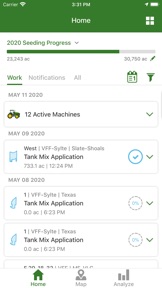
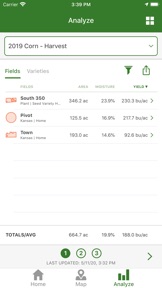
John Deere MyOperations™ takes remote management of your field operations and equipment to the next level. The MyOperations™ app connects with John Deere Operations Center, empowering you to evaluate expected vs. actual performance of job execution and machine utilization. Powered by an easy, reliable connection between you and your machines through JDLink™ Connect, the MyOperations™ app allows you to monitor completed field activities to determine the productivity and quality of each field for a given operation like Seeding, Application, Harvest, and Tillage. Or, enter the activities on non- JDLink™ Connect enabled machines by entering the details manually so that all crop records can be kept in one easy to use tool for reference. The MyOperations™ app is truly your solution to view machine and agronomic data anytime and anywhere. Access insights that help you proactively manage your day to day tasks to improve logistics and productivity, as well as increasing confidence that work across the operation is being executed as planned.
Contact your local dealer to learn more about the MyOperations™ app and the John Deere Operations Center.
Features include:
- View John Deere Operations Center information
- Easily Analyze all Seeding, Application, Harvest, and Tillage data across your organization
- Dashboard of area worked by operation type and field summary cards
- Field operation performance including quick view maps
- Correct data for elements like variety, product or field size
- View fields and field boundaries
- View agronomic information while in poor cell connectivity
- Add completed work for a complete crop record of activities on the field
- Manage Flags on the map
- View today’s Location History for each machine
- View machine location, hours, fuel levels and performance and efficiency measurements
- Link out to map app for driving directions to machines or fields
- View machine security and health alerts including diagnostic trouble codes (DTCs)
- View operator's in-cab display with Remote Display Access (RDA)
- Partner view of John Deere Operations Center to support growers

What's New in Version 4.5.3

Fixed a crash.

Seller

Name

John Deere

URL

Information

Developer

Categories

Version

4.5.3

Size

105.4 MB

Game Center

No

VPP Device Licensing

Yes

Rating

Rated: 4+

Compatibility

iOS 12.0 or later

Devices

iPhone 5s, iPhone 6, iPhone 6 Plus, iPhone 6s, iPhone 6s Plus, iPhone SE, iPhone 7, iPhone 7 Plus, iPhone 8, iPhone 8 Plus, iPhone X, iPhone XR, iPhone XS, iPhone XS Max, iPhone 11, iPhone 11 Pro, iPhone 11 Pro Max, iPhone SE (2nd generation), iPad (5th Generation) Wi-Fi, iPad (5th Generation) Wi-Fi + Cellular, iPad (6th generation) Wi-Fi, iPad (6th generation) Wi-Fi + Cellular, iPad Pro, iPad Pro (Cellular), iPad Pro (9.7-inch), iPad Pro (9.7-inch) (Cellular), iPad Pro 12.9-inch (2nd generation), iPad Pro 12.9-inch (2nd generation) Wi-Fi + Cellular, iPad Pro (10.5-inch), iPad Pro (10.5-inch) Wi-Fi + Cellular, iPad Pro (11-inch), iPad Pro (11-inch) Wi-Fi + Cellular, iPad Pro 12.9-inch (3rd generation), iPad Pro 12.9-inch (3rd generation) Wi-Fi + Cellular, iPad Air, iPad Air (Cellular), iPad Air 2, iPad Air 2 (Cellular), iPad Air (3rd generation), iPad Air (3rd generation) Wi-Fi + Cellular, iPad mini Retina, iPad mini Retina (Cellular), iPad mini 3, iPad mini 3 (Cellular), iPad mini 4, iPad mini 4 (Cellular), iPad mini (5th Generation), iPad mini (5th Generation) Wi-Fi + Cellular, iPad (7th generation) Wi-Fi + Cellular, iPad Pro 11-inch (2nd generation), iPad Pro 11-inch (2nd generation) Wi-Fi + Cellular, iPad Pro 12.9-inch (4th generation), iPad Pro 12.9-inch (4th generation) Wi-Fi + Cellular, iPad Air4, iPad Air4Cellular, iPad EighthGen, iPad EighthGenCellular, iPod touch (6th Generation), iPod touch (7th generation)

Languages

English, Bulgarian, Croatian, Czech, Danish, Dutch, Estonian, Finnish, French, German, Greek, Hungarian, Italian, Kazakh, Latvian, Lithuanian, Norwegian Bokmål, Polish, Portuguese, Romanian, Russian, Slovak, Slovenian, Spanish, Swedish, Ukrainian

App Store: Customer Ratings

Ratings & Reviews

4.5 of 5 (760 Ratings)

App Store: Customer Reviews

2019-10-31

Wind and temperature

I believe the app should track the wind speed, direction and weather when every pass was completed. This would be helpful.
louisfhl
Version 3.5.1
2019-05-12

Managing the Farm

Awesome app to manage/review the farm progress on a daily basis. Love it.
Farm@HW
Version 3.2.2
2019-05-10

Marking flags(rock)?

We would find more value in op center, if the machines could flag rocks in the fields, and then have them show up in operation center. And the important part would be if you could delete those flags(rocks) from a phone running operation center out in the field.
Curler62
Version 3.2.2
2019-05-03

In comparison to climate field view

I have been enjoying this app and plan to use it much more. Having a tally mark, for each operation, in each field would be so great!
Mark Cowan
Conexus customer
Version 3.2.0