Description
--[ Winner of MacStories Selects 2018. Must-Have iOS Apps, App of the Year ]--
--[ Featured as 'Apps We Love Right Now', 'Be More Productive' and 'Get Stuff Done' ]--
"GoodTask is all you need to organize your day and get things done for real"
If you're using iCloud or Outlook with Reminders and Calendars, it's for you.
GoodTask is a Powerful Task/Project Manager based on iOS Reminders & Calendars. You can use it as simple checklist to focus or as complex project management tool to get big things done.
GoodTask provides various viewpoints to the things that you care and need to be done. Manage your tasks, projects and even your life better with GoodTask.
General
- Syncs with iOS Reminders & Calendars
- Supports fully customizable recurring tasks
- Manage Reminders Lists and Calendars easily
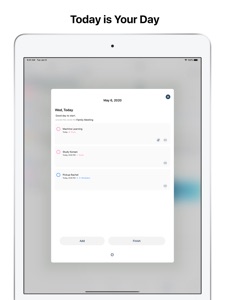
- List, Day, Week, Month view on each lists
- Add Quickly and Smartly with Presets and Text Snippets
Smart Lists
- List with selective Reminders Lists and Calendars
- Filter by including or excluding text/tags
- Filter by Priorities
- Overdue tasks, Location-based tasks, Recent tasks, etc.
Quick Actions
- Quickly edit tasks on the fly
- Bulk actions to edit/check/delete multiple tasks at once
- Duplicate, Change due dates, add/switch tags/lists, etc.
Other Key Features
- App Icon Badge & Notifications
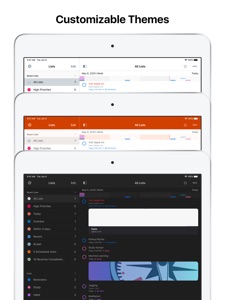
- Various Themes
- Long tap to move lists and tasks
- Supports portrait/landscape mode on all devices
- Supports iPad Pro and multi-tasking for all iPads
- Apple Watch with complications support
- Today Widget support
- Time Zone support
- Subtasks, Automatic Repeat after Completion & Manual sort (GoodTask 3 only)
Visit our website for more information (http://goodtaskapp.com) !
If you have questions, mention @goodtaskapp on twitter or send an email to contact@hahaint.com
= About Subscriptions =
Subscriptions in GoodTask is OPTIONAL and solely in purpose of supporting the continuous development of the app. In case you choose to subscribe without unlocking everything, it'll be unlocked automatically to fully use the app.
- Supporter is an auto-renewing subscription and is available for yearly periods.
- Payment will be charged to your iTunes account at confirmation of purchase.
- Your subscription will automatically renew unless auto-renew is turned off at least 24-hours before the end of the current subscription period.
- Your account will be charged for renewal within 24-hours prior to the end of the current subscription period. Automatic renewals will cost the same price you were originally charged for the subscription.
- You can manage your subscriptions and turn off auto-renewal by going to your Account Settings on the App Store after purchase.
= Terms of Use & Privacy Policy =
Terms of Use : http://hahaint.com/terms
Privacy Policy : http://hahaint.com/privacy
If you need support, e-mail us at contact@hahaint.com
We'll get to you right away. :)
[ To Do List | Task Manager | Reminders | To-Do Checklist | Project Manager | Planner | Lists with Calendar ]
What's New in Version 5.8.3
Bugs fixes with a lot of caffeine intakes
(Previously..)
- Widgets - Theme overlay : Default/Light/Dark/Black
- Widgets - Icon type (List Widget) : Line/Dot
- Widgets - Highlight Overdue Title : Changes title color to red for overdue tasks. Follows in app settings
- Widgets - Recurring icon is shown next to date
- Widgets - URL Link : Arrow is shown next to item title if it has URL link. Tapping it will open URL
- Revised Date Picker
- Several adjustments, improvements & bugs fixed
New Widget for iOS 14 and tons of improvements!
- List Widget
- Show one of your list on your home screen
- Choose between Default/Compact/Compact 2/Full view
- Optionally show calendar. When hidden, choose between 1 or 2 Column (medium/ large size)
- Favorites Widget
- Add your Favorites on your home screen
- New Favorites type : New Task
- Preset title, list, notes, dates, priority and subtasks
- Open camera, audio or paste clipboard to notes directly
- Choose custom icon and color
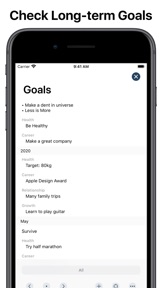
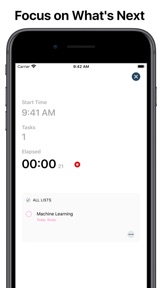
- New Favorites type : (Link to Goals/Reports/Today/Next page)
- Modern Lists view
- Navigation bar is now integrated with background view. Themes will follow background color rather than navigation color.
- New System Theme added: iOS
- New icons for lists
- Choose between 70+ icons
- Reminders list can also change icons
- Long tap on calendar will open option to add task, calendar event and templates.
- Choosing templates on certain day will make tasks' due dates relative to that date. You can make tasks according to project's due date backwards.
- Relative time option added to Templates - Task
- Swipe to change priority (Settings - General - Swipe Action)
- Swipe to complete rather than tap (Settings Appearance - Icon: Hide)