AboutTermsPrivacyContact
 
Updating
Lurssen Mastering Console

Lurssen Mastering Console

Released: 2016-01-20
©2002-2018 IK Multimedia Production Srl
Lurssen Mastering Console - QR Code
Version 1.1.1
4+
Download on the App Store
Version 1.1.1
4+
Download on the App Store
Released: 2016-01-20
©2002-2018 IK Multimedia Production Srl

iPhone Screenshots

Screenshot
Screenshot
Screenshot
Screenshot
Screenshot

iPad Screenshots

Screenshot
Screenshot
Screenshot
Screenshot
Screenshot

Description

Lurssen Mastering Console puts you at the controls in the studio with all of the secret tools, settings and techniques of world renowned multi-GRAMMY Award winning mastering engineer Gavin Lurssen and his team. Now you can master your music on the go on your iPhone/iPad and get the professional, Grammy award-winning sound that the studio is known for. Pop, rock, hip-hop and more, Lurssen Mastering Console can help you achieve amazing mastering results when a trip to Los Angeles just isn’t in the budget.
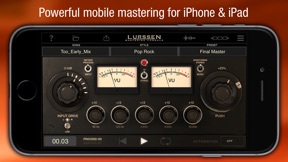
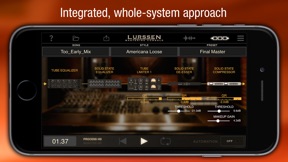
Lurssen Mastering Console is a totally unique and new approach to digital audio mastering. It's designed to help you capture the magic of the Lurssen Mastering studio’s entire mastering audio processing philosophy. Instead of giving you just a collection of individual processors and presets, Lurssen Mastering Console provides you with models of the complete mastering gear processor chain as a whole. The interactions between the individual processors have been digitally recreated which recreates the synergistic "whole is greater than the sum of its parts" sound that has earned Gavin and Lurssen Mastering multiple Grammys.
With Lurssen Mastering Console, you have automatic access to a lifetime's worth of professional audio mastering experience. It helps you quickly get great sounding results thanks to its 40 pre-made "Styles" templates, which have been created and optimized by Gavin Lurssen, mastering engineer Reuben Cohen and the rest of the team. These templates reflect decades of combined mastering experience and fit a broad range of musical genres.
Using Lurssen Mastering couldn't be easier: Just create a project, load a song, then select an appropriate "Style" from the drop-down menu. Take control via an Input Drive knob and a five band EQ as well as a "PUSH" knob, which lets you subtly and uniformly nudge the EQs so you can "ride" the flow of the song and add that special Lurssen "magic" to your music. You can view and automate changes to the two knobs by using the waveform display with three different automation modes. You can make adjustments to EQ settings and save those as presets for easy recall — a preset consists of a style plus your adjustments. You can also view the physical gear chain and make subtle adjustments via the Chain view. When you've finished your mastering work, you can export your song to File Sharing, SoundCloud and more in a variety of popular file formats for final distribution and delivery.
With the Lurssen Mastering Console you can easily master audio with your iPhone/iPad while on the go.
Features:
• Created with Grammy Award winning Mastering Engineer Gavin Lurssen and his team
• Digitally reproduces Lurssen Mastering's unique studio workflow, techniques and signal chain philosophy
• Synergistic “whole is greater than the sum of its parts” mastering app for iPhone/iPad
• 40 pre-made "Styles" created by Lursssen Mastering that reproduce the settings and gear used to master different genres
• 3 easy-to-navigate displays: A Studio view with controls, a Wave waveform view and a Chain view for the individual processors
• Controllable Input Drive knob
• Adjustable 5 band EQ with fixed frequency
• "PUSH" Knob to subtly enhance selected song passages via uniform EQ adjustment
• Full automation available to adjust controls to audio content
• Gangable Input Drive control for stereo balance tweaks
• Input/Process assignable VU metering
• Stereo/Mono monitoring capability
• 88.2/96kHz output processing
• Audio import from device library
• FREE app that allows demo of settings and features (with intermittent noise injected plus no export options)
• Play/Process In-app purchase unlocks application
• HD Engine In-app purchase unlocks high res processing and export
• Digital Delivery Mastering (DDM) option added to the HD Engine In-app purchase

What's New in Version 1.1.1

-General reliability & security improvements

Seller

Information

Developer

Categories

Version

1.1.1

Size

129.2 MB

Game Center

No

VPP Device Licensing

Yes

Rating

Rated: 4+

Compatibility

iOS 10.0 or later

Devices

iPhone 5, iPhone 5c, iPhone 5s, iPhone 6, iPhone 6 Plus, iPhone 6s, iPhone 6s Plus, iPhone SE, iPhone 7, iPhone 7 Plus, iPhone 8, iPhone 8 Plus, iPhone X, iPhone XR, iPhone XS, iPhone XS Max, iPhone 11, iPhone 11 Pro, iPhone 11 Pro Max, iPhone SE (2nd generation), iPhone 12, iPhone 12Mini, iPhone 12Pro, iPhone 12ProMax, iPad (4th Generation) (Wi-Fi), iPad (4th Generation) (4G), iPad (5th Generation) Wi-Fi, iPad (5th Generation) Wi-Fi + Cellular, iPad (6th generation) Wi-Fi, iPad (6th generation) Wi-Fi + Cellular, iPad Pro, iPad Pro (Cellular), iPad Pro (9.7-inch), iPad Pro (9.7-inch) (Cellular), iPad Pro 12.9-inch (2nd generation), iPad Pro 12.9-inch (2nd generation) Wi-Fi + Cellular, iPad Pro (10.5-inch), iPad Pro (10.5-inch) Wi-Fi + Cellular, iPad Pro (11-inch), iPad Pro (11-inch) Wi-Fi + Cellular, iPad Pro 12.9-inch (3rd generation), iPad Pro 12.9-inch (3rd generation) Wi-Fi + Cellular, iPad Air, iPad Air (Cellular), iPad Air 2, iPad Air 2 (Cellular), iPad Air (3rd generation), iPad Air (3rd generation) Wi-Fi + Cellular, iPad mini Retina, iPad mini Retina (Cellular), iPad mini 3, iPad mini 3 (Cellular), iPad mini 4, iPad mini 4 (Cellular), iPad mini (5th Generation), iPad mini (5th Generation) Wi-Fi + Cellular, iPad (7th generation) Wi-Fi + Cellular, iPad Pro 11-inch (2nd generation), iPad Pro 11-inch (2nd generation) Wi-Fi + Cellular, iPad Pro 12.9-inch (4th generation), iPad Pro 12.9-inch (4th generation) Wi-Fi + Cellular, iPad Air (4th Generation) (Wi-Fi), iPad Air (4th Generation) (Wi-Fi + Cellular), iPad (8th generation) Wi-Fi, iPad (8th generation) Wi-Fi + Cellular, iPod touch (6th Generation), iPod touch (7th generation), Apple Watch Series 4, Apple Watch Series 5, Apple Watch Series 6 (GPS), Apple Watch Series 6 (GPS + Cellular), Apple Watch Series SE (GPS), Apple Watch Series SE (GPS + Cellular)

Languages

English, Chinese, Japanese

App Store: Customer Ratings

Ratings & Reviews

3.0 of 5 (5 Ratings)

App Store: Customer Reviews

2017-09-04

Very Good

can't go wrong with this. easy to use and get superb results quickly. I am making most of my music on the ipad now, so this fits in well.
It is very good value when compared to the hundreds of dollars i have spent on desktop plugins, and gets the same results.
use audioshare to easily load your files into this app.
MultiBand
Version 1.1.0
2017-06-19

Impossible to tell

I want to like this app, but the only way to test the features is by importing a mix from my music library. I don't work on mixes and transfer them to iTunes. If anything I use Dropbox or other file sharing methods. The best I was able to do was test with an already mastered song from my downloads, but that's not a great indication. Would love to give this a more thorough test, but that limitation ensures I won't.
p_wats
Version 1.1.0
2016-07-17

Probably great but importing options are brutal.

After dropping a small fortune on this app I was excited to get mastering when all of a sudden I realized that I can't import anything without a pile of screwing around. No Dropbox? iCloud? Audio Share? Nothing seems to work. Definitely feeling like a waste. Positive Grids FinalTouch Mastering app makes this feel like a prison in comparison, they have like 8 options or more for the simple task of importing your tracks, tons more presets to start you off and it's like 1/10th the price. I really want to love this app but in its current state I'm not very Impressed by the flexibility and user friendly import options. Please fix stat.
XUAG
Version 1.0.4