AboutTermsPrivacyContact
 
Updating
Sketch 3D

Sketch 3D

Released: 2015-08-22
© 2015 - 2020 nurbs-g.com
Sketch 3D - QR Code
Version 1.38
4+
Download on the App Store
Version 1.38
4+
Download on the App Store
Released: 2015-08-22
© 2015 - 2020 nurbs-g.com

iPhone Screenshots

Screenshot
Screenshot
Screenshot
Screenshot
Screenshot

iPad Screenshots

Screenshot
Screenshot
Screenshot
Screenshot
Screenshot

Description

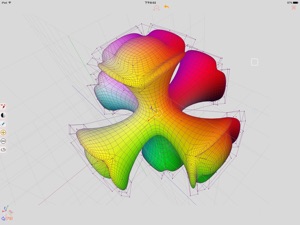
Sketch 3D is a tool for designing 3D models from your fingertips. You could download models from others, and could also share your great designs with other users by saving models in Public space.
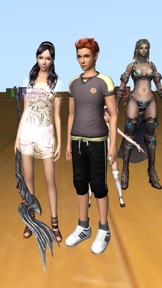
New feature: Use True Depth Camera to capture face model.
New feature: Support using video as model texture.
You could use video clips from Photo Album, or from Internet URL (YouTube URL not supported), and then apply it onto a model as texture map.
New feature: Capture movie from the 3D scene.
Note! If your device could not capture movie, then, could try out a smaller output resolution (by tapping the control pane). However, arbitrary output size may stop capturing prematurely.
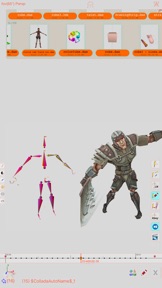
New feature: Design 3D model animation with skeleton structure.
You could design a skeleton structure by placing bones in hierarchical relation. Attach model to the skeleton, and then moving the bones to define different poses. Each pose represented as a keyframe in the timeline view. And animation sequence is produced by playing interpolation between the keyframes.
Features:
- Import 3D content directly from browser or email, either in .zip, .rar, .7z.
- Support formats: Collada DAE, OBJ, 3DS, STL(for 3D printing), and others.
- Import/export to iCloud drive, via iTune File Sharing, or to Public area via Apple CloudKit Service.
- Supports AirDrop.
- Support Quad faces.
- Smooth surfaces using Subdivision.
- Mirroring editing.
- 2-fingers vertex movement, 3 or 4-fingers planar shape creation.
- Versatile multi-touches drag-through-space gestures to support editing and changing viewing angle at the same time.
- Flexible face strip drawing.
- Stitching boundary faces. Stitch triangle soap into connected faces. Stitch over edge or vertex to form a larger face.
- Stitching Triangles to Quads.
- Loop Cut faces.
- Bevel edges.
- Extrude faces or edges.
- Revolve (Spin).
- Vertex Smoothing.
- Vertex Slide along edges.
- Crease Editing after mesh subdivision.
- Split mesh from, or Join mesh to the editing one.
- Support hierarchical mesh node structure.
- Direct vertex color editing when texture map is not used.
- Edit texture map UV coordinates, include atlas generation.
- 3D Text generation.
- Scene interaction with your created shape.
- Design Animation with skeleton structure.
- Capture movie from the 3D scene.
- Support using video as model texture map.
What's New in Version 1.38

- Modified iCloud view to handle too many iCloud models in private view.  
- Revised the camera movement limits when setting the viewing style of Turntable mode.  
- Modified the Timeline view allow zooming out without limit, and provide sliding gesture.  
- Fixed non-responding output size changes of the Movie capturing view.

Seller

Name

Victor Ng

Information

Developer

Categories

Version

1.38

Size

56.1 MB

Game Center

Yes

VPP Device Licensing

Yes

Rating

Rated: 4+

Compatibility

iOS 7.1 or later

Devices

iPhone 4, iPhone 4S, iPhone 5, iPhone 5c, iPhone 5s, iPhone 6, iPhone 6 Plus, iPhone 6s, iPhone 6s Plus, iPhone SE, iPhone 7, iPhone 7 Plus, iPhone 8, iPhone 8 Plus, iPhone X, iPhone XR, iPhone XS, iPhone XS Max, iPhone 11, iPhone 11 Pro, iPhone 11 Pro Max, iPhone SE (2nd generation), iPad 2 (Wi-Fi), iPad 2 (3G), iPad (3rd Generation) (Wi-Fi), iPad (3rd Generation) (4G), iPad (4th Generation) (Wi-Fi), iPad (4th Generation) (4G), iPad (5th Generation) Wi-Fi, iPad (5th Generation) Wi-Fi + Cellular, iPad (6th generation) Wi-Fi, iPad (6th generation) Wi-Fi + Cellular, iPad Pro, iPad Pro (Cellular), iPad Pro (9.7-inch), iPad Pro (9.7-inch) (Cellular), iPad Pro 12.9-inch (2nd generation), iPad Pro 12.9-inch (2nd generation) Wi-Fi + Cellular, iPad Pro (10.5-inch), iPad Pro (10.5-inch) Wi-Fi + Cellular, iPad Pro (11-inch), iPad Pro (11-inch) Wi-Fi + Cellular, iPad Pro 12.9-inch (3rd generation), iPad Pro 12.9-inch (3rd generation) Wi-Fi + Cellular, iPad Air, iPad Air (Cellular), iPad Air 2, iPad Air 2 (Cellular), iPad Air (3rd generation), iPad Air (3rd generation) Wi-Fi + Cellular, iPad mini (Wi-Fi), iPad mini (4G), iPad mini Retina, iPad mini Retina (Cellular), iPad mini 3, iPad mini 3 (Cellular), iPad mini 4, iPad mini 4 (Cellular), iPad mini (5th Generation), iPad mini (5th Generation) Wi-Fi + Cellular, iPad (7th generation) Wi-Fi, iPad Pro 11-inch (2nd generation), iPad Pro 11-inch (2nd generation) Wi-Fi + Cellular, iPad Pro 12.9-inch (4th generation), iPad Pro 12.9-inch (4th generation) Wi-Fi + Cellular, iPad Air (4th Generation) (Wi-Fi), iPad Air (4th Generation) (Wi-Fi + Cellular), iPad (8th generation) Wi-Fi, iPad (8th generation) Wi-Fi + Cellular, iPod touch (5th generation), iPod touch (6th Generation), iPod touch (7th generation)

Languages

English, Chinese, Russian

App Store: Customer Ratings

Ratings & Reviews

2.0 of 5 (16 Ratings)

App Store: Customer Reviews

2020-02-07

Good potential

Seems to have extremely good potential, but I think you need to take a step back and look at a program like Autodesk maya. Your naming conventions for tools are so confusing for us who are coming from industry standards.
Pandorafae
Version 1.36
2020-01-26

I Feel Like this App has Potential

This app probably has potential, but it’s very confusing to use for beginners in 3D animation/modelling/etc. You guys should implement some sort of tutorial for everything the app offers.
CrazyCatLady😹🐱🐈
Version 1.36
2020-01-11

How do we do stuff

I can’t do anything
hishy brown
Version 1.36
2019-07-24

uh

no beginning tutorial! it isn’t really helpful for beginners, and the video tutorials don’t exactly reflect what the app is really like.
NERRRRDDDD
Version 1.36
2019-04-14

Sketch 3D

No idea if this is good app or not. No way to figure out how to use it without a manual, which doesn’t seem to exist. Might be great - who knows?
Toffeetreat
Version 1.33
2017-06-04

Confused

Um how do I do this?
A LA-Z GUY
Version 1.20
2016-09-12

So confusing

I was so confused while using it, there wasn't anything to help if you are new to 3D modelling
FATTY12332
Version 1.11